

🕐 Classes Now — Real-Time Monitoring
The Classes Now screen is the school's operational monitor. It allows the principal to know at any moment which teacher is teaching, in which classroom, and to which section, like a live control board of all academic activity.
👤 Primary profile: Principal / Vice Principal / Academic Coordination
Access: Side menu → Dashboard → Classes Now
1. General View
Upon entering, a grid of cards is displayed, one for each school section, grouped by educational level (Preschool, Primary, Secondary).
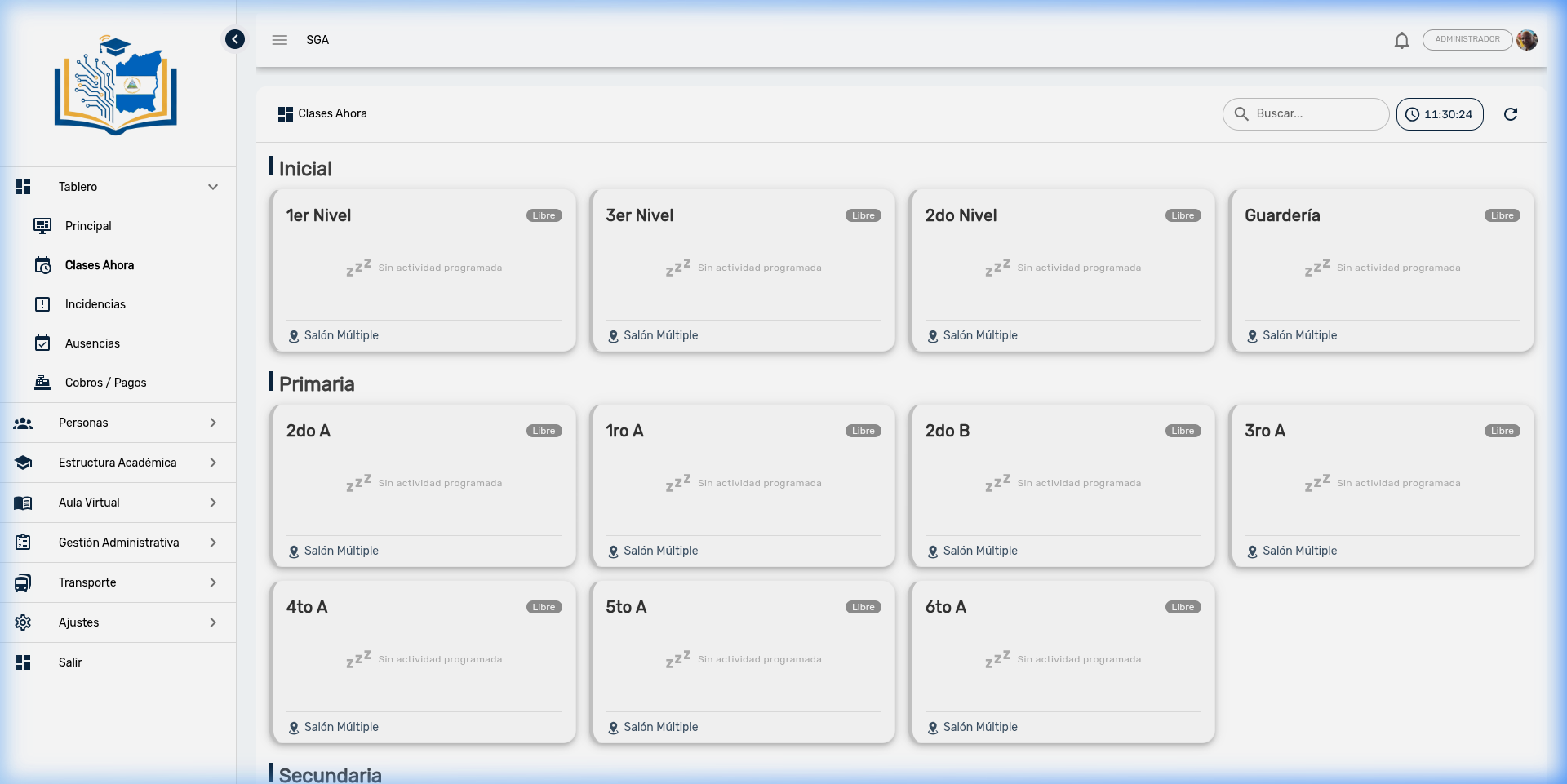
Each card indicates whether the section has a class right now or is in a free period.
Top bar
| Element | Function |
|---|---|
| Search 🔍 | Filters cards by section name or teacher |
| Live clock 🕐 | Displays the current server time in HH:mm:ss format, updated every second |
| Reload button 🔄 | Forces data refresh without waiting for the automatic cycle |
2. Section Cards
Section with active class
When a section has a class in progress, its card is displayed with a green border and light background, indicating activity:
| Element | What it shows |
|---|---|
| Section name | Group identifier (e.g., "4th A", "1st Level B") |
| "In class" badge | Green indicator confirming activity in progress |
| Subject | Subject being taught (e.g., "Mathematics", "Language and Literature") |
| Teacher | 👨🏫 Name of the teacher giving the class |
| Schedule | 🕐 Block start and end time (e.g., "8:00 - 9:30") |
| Classroom | 📍 Room where the section is located |
| Live indicator | 🟢 Blinking green dot confirming the real-time signal |
Free section (no class)
When a section has no class scheduled at the moment, the card is displayed with a gray border, dimmed background, and the message "No scheduled activity":
| Element | What it shows |
|---|---|
| Section name | Group identifier |
| "Free" badge | Gray indicator |
| Message | "No scheduled activity" with an idle icon |
| Classroom | 📍 Room assigned to the section |
3. Organization by Level
Cards are visually grouped by educational level, with a colored separator between each group:
| Group | Content |
|---|---|
| Preschool | All preschool and nursery sections |
| Primary | Sections from 1st to 6th grade |
| Secondary | Sections from 7th to 11th year |
This allows the principal to quickly scan an entire level at a glance.
4. Automatic Refresh
The panel updates automatically to reflect period changes:
| Aspect | Detail |
|---|---|
| Section data | Reloads every 60 seconds automatically |
| Clock | Updates every 1 second |
| Manual reload | 🔄 button to force immediate refresh |
Period changes
When a class block ends and the next one begins, the panel reflects the change automatically on the next refresh cycle. No need to manually reload the page.
5. Practical Use Cases
| Situation | How the panel helps |
|---|---|
| Verify teacher coverage | At 8:00 AM, the principal checks if all sections have their teacher in the classroom |
| Locate a student | If a parent comes to pick up their child, the principal sees which classroom and teacher they're with |
| Detect sections without activity | Gray cards ("Free") indicate sections that should have a class but don't |
| Supervision during the day | Verify at any moment that classes are being taught according to the programmed schedule |
| Classroom reassignment | Quickly identify which classrooms are free in case of emergency or special activity |
Recommendation for the principal
Check this panel at the start of each school day (7:30 - 8:00 AM) to confirm that all teachers are covering their classes. If a section appears "Free" when it should be in class, it means the teacher hasn't arrived or there is no schedule programmed for that hour.
6. Quick Search
The search bar at the top allows filtering cards in real time:
| Search | Result |
|---|---|
Type "4th" | Shows only 4th grade sections |
Type "López" | Shows sections where teacher López has a class |
| Clear the field | Shows all sections again |
If there are no results for the search, a message "No sections found" is displayed with an empty calendar icon.
Frequently Asked Questions — Administration
| Question | Answer |
|---|---|
| Is the data really real-time? | The panel updates every 60 seconds automatically. The clock updates every second. Use the 🔄 button if you need to see the most recent status immediately. |
| Why does a section appear "Free" during class hours? | It may mean that no schedule is loaded for that section at that time, or that the class block just ended and the next one hasn't started yet. Check the Schedule module. |
| Can I see classes for a specific day? | No. This panel only shows the current state (right now). To check the full schedule, use the Schedule module in Virtual Classroom. |
| Does the panel work on weekends? | Yes, but all sections will appear as "Free" if no classes are scheduled for Saturday or Sunday. |
| Can I tell if a teacher arrived late? | Not directly. The panel shows if a class is in progress, not whether the teacher arrived on time. For that, check the teacher attendance log if implemented. |
| Who can see this panel? | Users with schedule query permission. Generally: principals, vice principals, and academic coordinators. |