

🎯 Grades
The Grades module is the consolidated view of all recorded scores. It allows you to review academic results from four different perspectives through a tab system.
Access path: Side menu → Virtual Classroom → Grades
1. Query Filters
The module uses four cascading filters that must be selected to display grades:
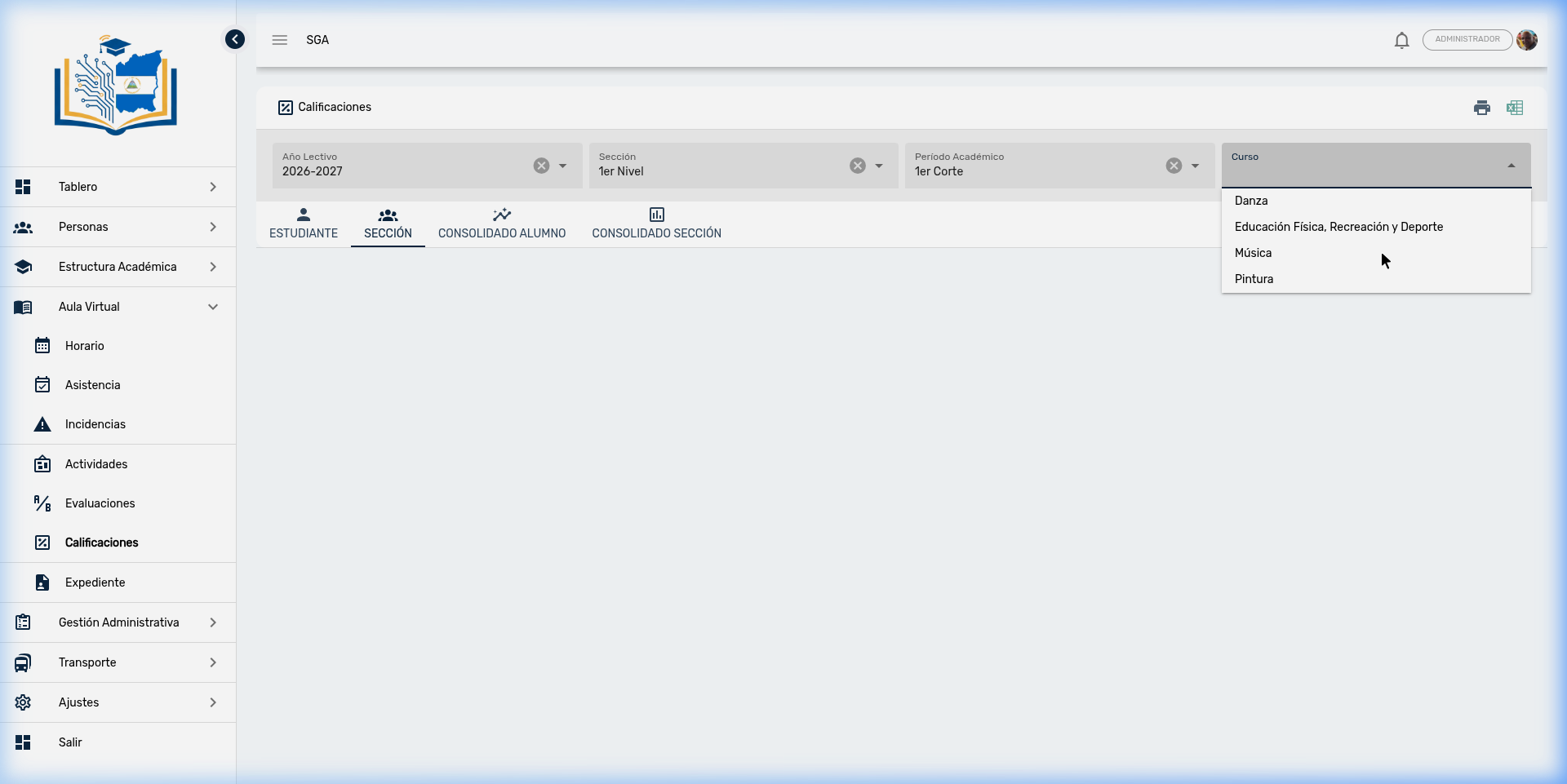
- School Year → Select the annual period (e.g., 2026-2027)
- Section → Select the grade or level (e.g., 1st Level)
- Academic Period → Select the evaluation period (e.g., 1st Term)
- Course → Select the subject (e.g., Music, Dance, Painting)
💡 Tip
The print 🖨️ and Excel export 📊 icons in the upper right corner allow you to generate printed reports and spreadsheets directly from any view.
2. Tab: SECTION
The SECTION view displays grades for all students in the section in a comparative table. Each column represents an evaluation (Eval 1, Eval 2, Eval 3...) and the final column shows the period Result.
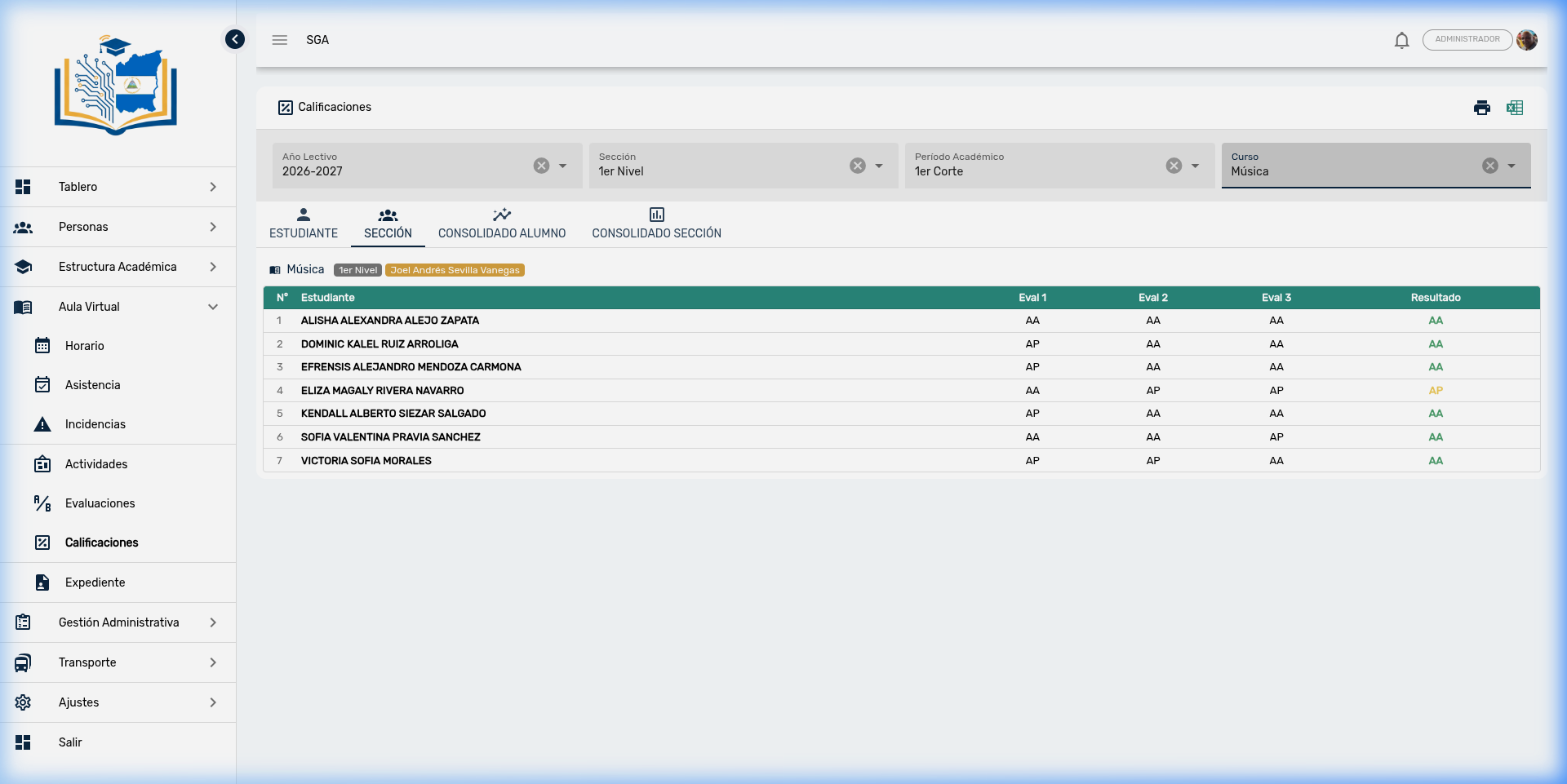
Table Columns
| Column | Description |
|---|---|
| # | Student order number |
| Student | Full name of the enrolled student |
| Eval 1, Eval 2... | Result of each period evaluation (AA, AP, AE, or numerical value) |
| Result | Automatically calculated final grade for the period |
📌 Note
The table displays contextual course information in the header: course name, section, and responsible teacher (green badge).
3. Tab: STUDENT
The STUDENT view allows you to check the grades of an individual student. When you select this tab, a selector appears with the names of all students enrolled in the course.
When you choose a student, their grade details are displayed showing all period evaluations with the breakdown by criterion.
🎯 Use Case
This view is ideal for parent-teacher meetings, as it allows you to show the detailed performance of a single student without exposing other students' grades.
4. Tab: SECTION CONSOLIDATED
The SECTION CONSOLIDATED view offers a complete annual perspective of the entire section. It shows grades organized by semesters (Semester I and Semester II), with columns for each evaluation period and corresponding averages.
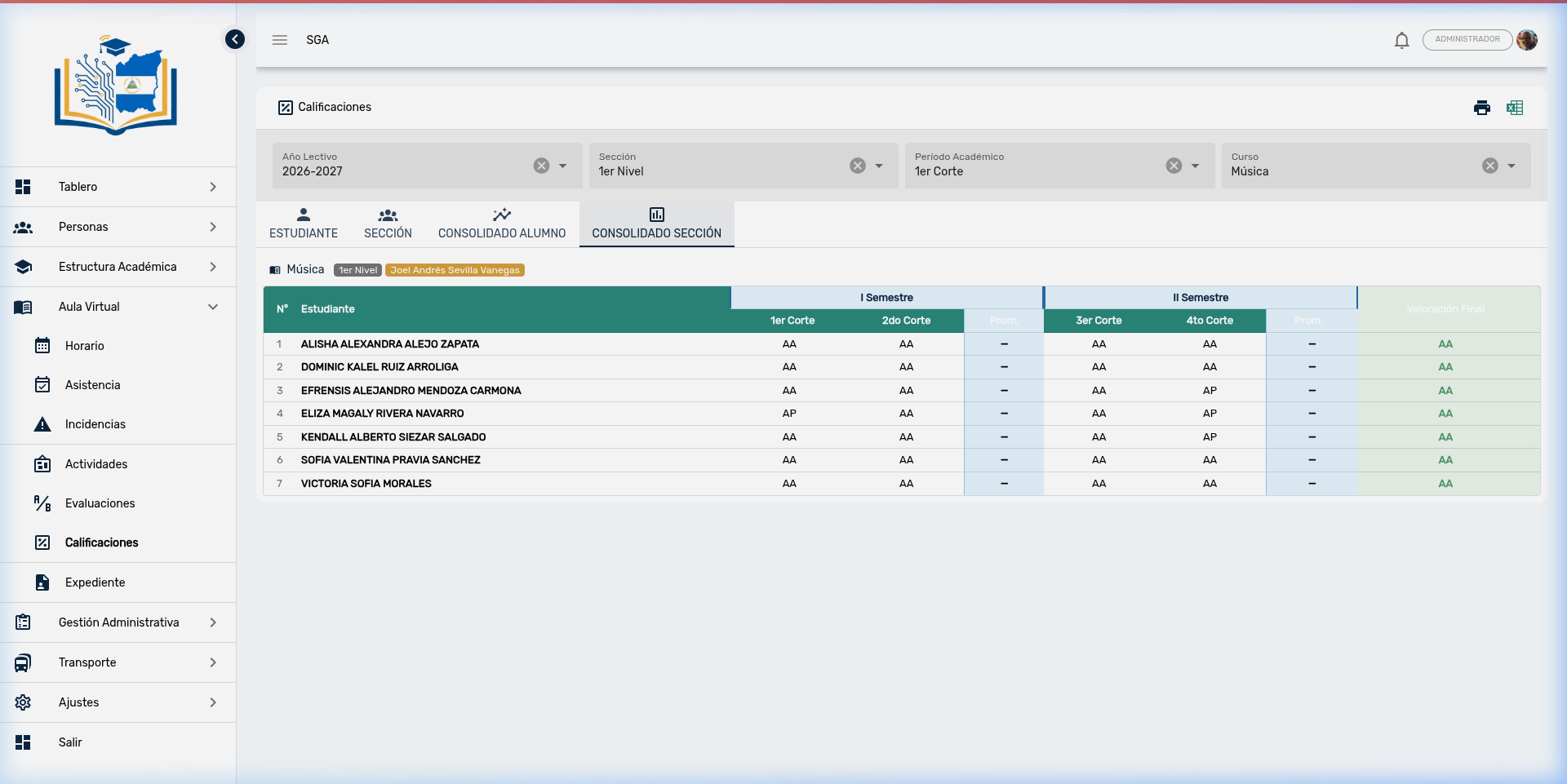
Consolidated Structure
| Group | Columns | Description |
|---|---|---|
| Semester I | 1st Term, 2nd Term, Avg. | First semester results and average |
| Semester II | 3rd Term, 4th Term, Avg. | Second semester results and average |
| Final Assessment | — | Definitive grade for the school year |
📊 Academic Reports
From this view, the print button 🖨️ generates the official Report Card, and the Excel button 📊 generates the exportable Consolidated Report. These documents are the ones officially delivered to parents and to the Ministry of Education (MINED).
5. Tab: STUDENT CONSOLIDATED
Similar to the Section Consolidated, but focused on an individual student. It shows the student's complete record across all courses for the school year, providing a panoramic view of academic performance.
🎯 Use Case
Ideal for generating the Individual Report Card delivered to each parent at the end of each period or school year.
6. Complete Flow: Evaluation → Grade → Report
The following diagram summarizes the complete workflow of the evaluation process:
| Step | Module | Action | Result |
|---|---|---|---|
| 1 | Evaluations | Define evaluation with criteria | Evaluation structure created |
| 2 | Evaluations → Grade | Enter scores per student and criterion | Grades captured |
| 3 | Grades → Section | Review period results | Comparative view of all students |
| 4 | Grades → Consolidated | Review annual results | Report Card / Official Consolidated |
⚡ Important
Step 1 (Define) is a mandatory prerequisite. It is not possible to grade students if no evaluation with defined criteria exists beforehand.
7. Navigation Summary — Evaluations and Grades
| Element | Location | Function |
|---|---|---|
| 📊 Evaluations | Side menu → Virtual Classroom | Define evaluation structure and criteria |
| ➕ New | Upper right corner (requires filters) | Create a new evaluation |
| 👥 Grade | Row actions menu | Open the grade entry interface |
| ✏️ Edit | Row actions menu | Modify name, date, and criteria |
| 🗑️ Delete | Row actions menu | Delete evaluation with confirmation |
| 🎯 Grades | Side menu → Virtual Classroom | View captured grades across all views |
| Upper right corner (Grades) | Generate printed Report Card | |
| 📊 Excel | Upper right corner (Grades) | Export Consolidated to spreadsheet |
| STUDENT | Tab in Grades | Individual student view |
| SECTION | Tab in Grades | Comparative view of all students |
| STUDENT CONSOLIDATED | Tab in Grades | Annual history of one student |
| SECTION CONSOLIDATED | Tab in Grades | Annual history of the entire section |