

School Terms (School Years)
A School Term represents a complete school cycle. In Nicaragua, the school year generally begins in September and ends in June of the following year, spanning approximately 10 months of academic activity.
Access path: Side menu → Academic Structure → School Terms
School Terms List
When entering the module, a table is displayed with all school terms registered in the system. The counter next to the title indicates the total number of terms.
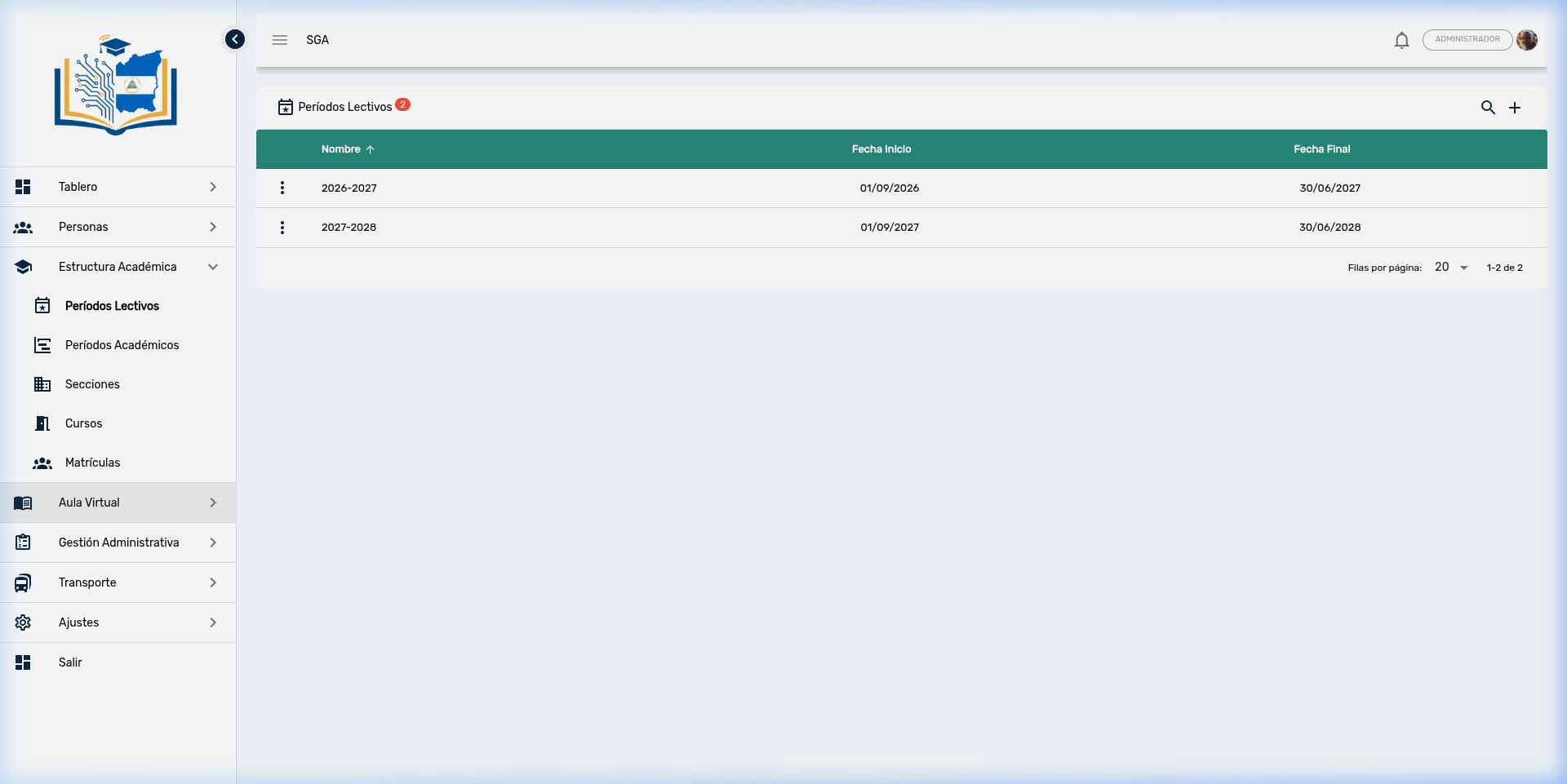
Visible Columns
| Column | Description |
|---|---|
| Name | Term identifier (year-year format, e.g., 2026-2027) |
| Start Date | First day of the school term |
| End Date | Last day of the school term |
Tip
Note that terms are named using the start year - end year format (e.g., 2026-2027). This makes it easy to quickly identify the current school term.
Term Search
To filter terms, click the search icon (🔍) in the upper right corner.
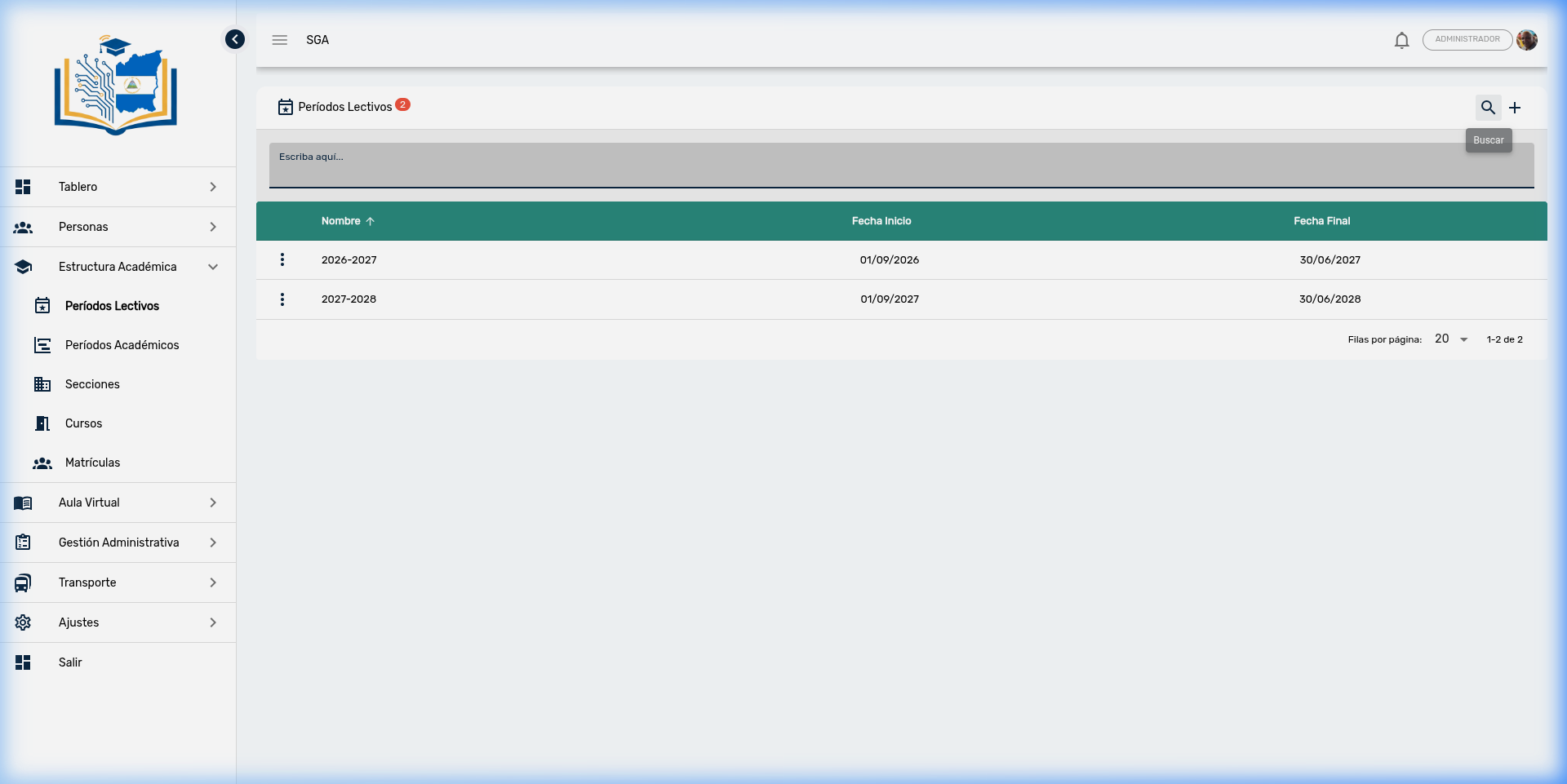
Steps to search:
- Click the search icon (🔍)
- Type the year you are looking for (e.g., 2026)
- The table will filter automatically
Actions per Term
Each term has an actions menu represented by three vertical dots (⋮):
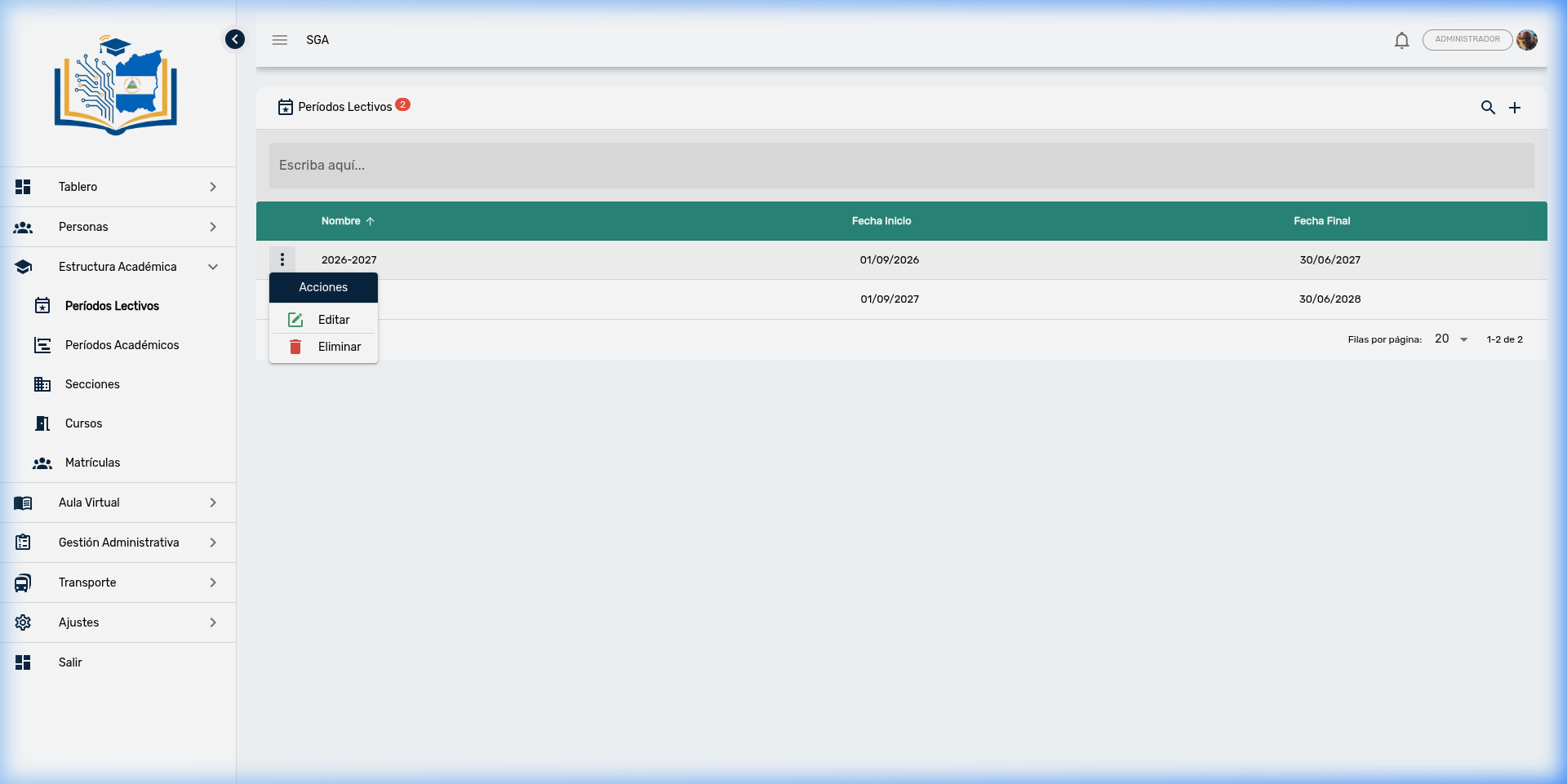
| Action | Icon | Description |
|---|---|---|
| Edit | ✏️ | Modifies the name or dates of the term |
| Delete | 🗑️ | Deletes the school term (requires confirmation) |
Important
The system does not allow deleting a school term that has sections, academic periods, courses, or other associated information. If you attempt to delete it, you will receive an error message. You must first delete all records linked to that school year.
Edit a School Term
When selecting Edit, a dialog opens with the term data:
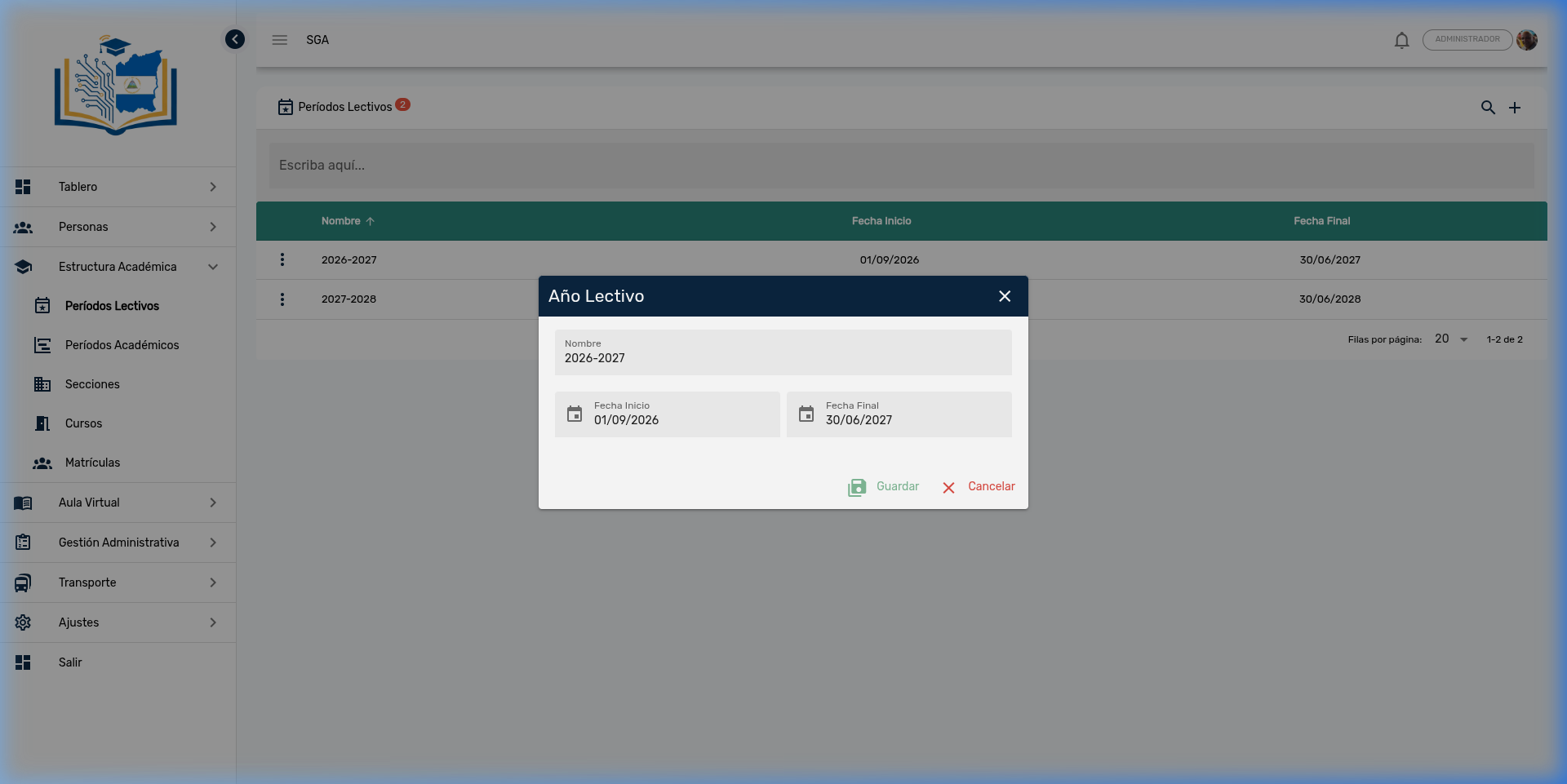
Form fields:
| Field | Description | Example |
|---|---|---|
| Name | School term identifier | 2026-2027 |
| Start Date | First day of classes | 09/01/2026 |
| End Date | Last day of the term | 06/30/2027 |
Buttons:
| Button | Function |
|---|---|
| 💾 Save | Saves the changes made |
| ✕ Cancel | Closes the dialog without saving |
Create a New School Term
To create a new term, click the + button in the upper right corner:
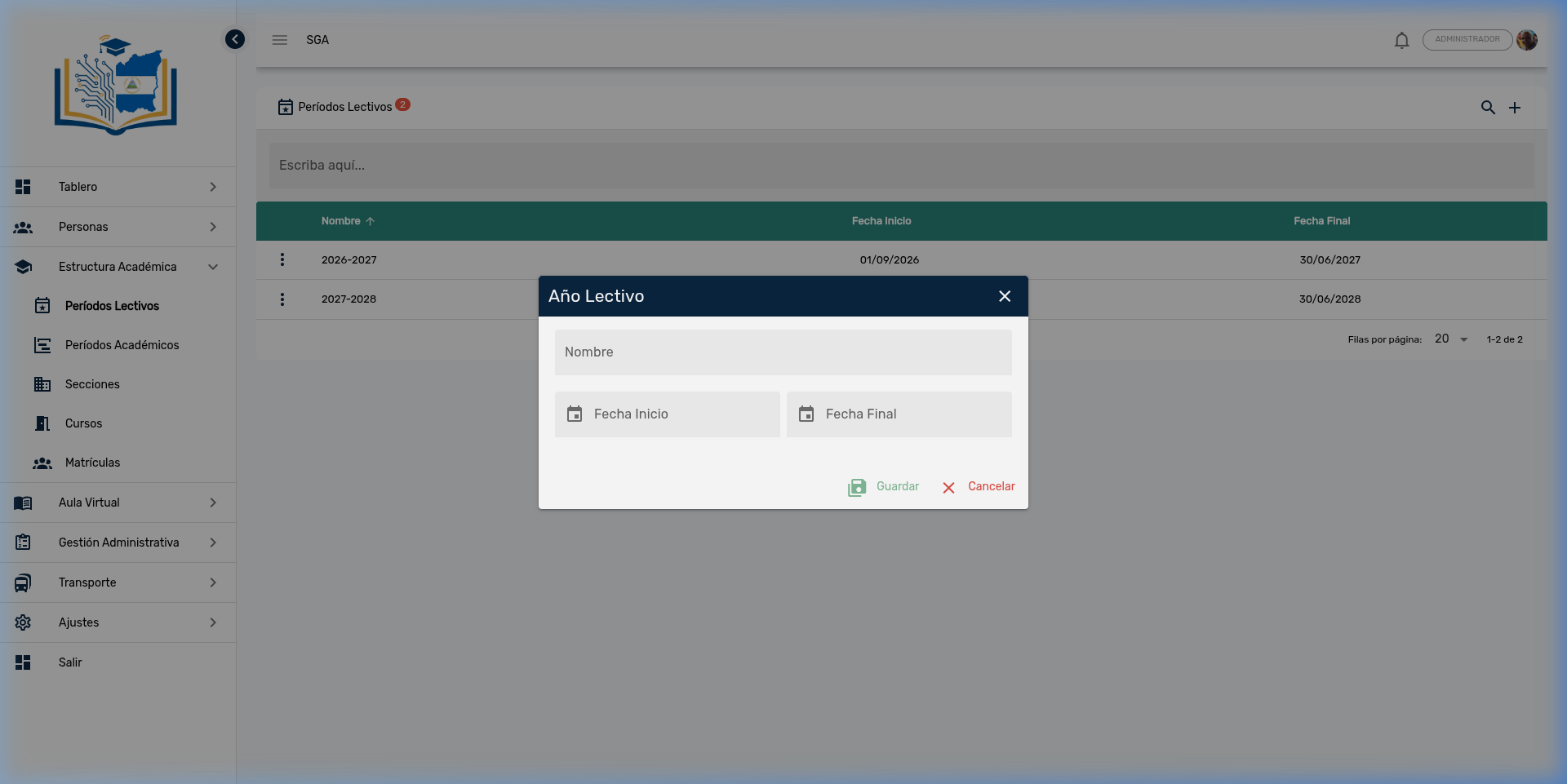
Steps to create a term:
- Click the + button
- Type the Name of the term (e.g., 2028-2029)
- Select the Start Date using the date picker (📅)
- Select the End Date using the date picker (📅)
- Click Save
Tip
The term name does not have to exactly match the dates, but by convention the year-year format is used to maintain consistency.
Navigation Summary — School Terms
| Element | Location | Function |
|---|---|---|
| 🔍 Search | Upper right corner | Search for terms |
| ➕ Add | Upper right corner | Create new term |
| ⋮ Three dots | Beginning of each row | Actions: Edit, Delete |
| 💾 Save | Inside the dialog | Confirm creation or editing |
| ✕ Cancel | Inside the dialog | Discard changes |
Academic Periods (Evaluation Periods)
Academic Periods are the evaluation periods within a school year. Each period represents a time span during which evaluations are conducted, grades are recorded, and report cards are generated for students.
Access path: Side menu → Academic Structure → Academic Periods
Key Concept
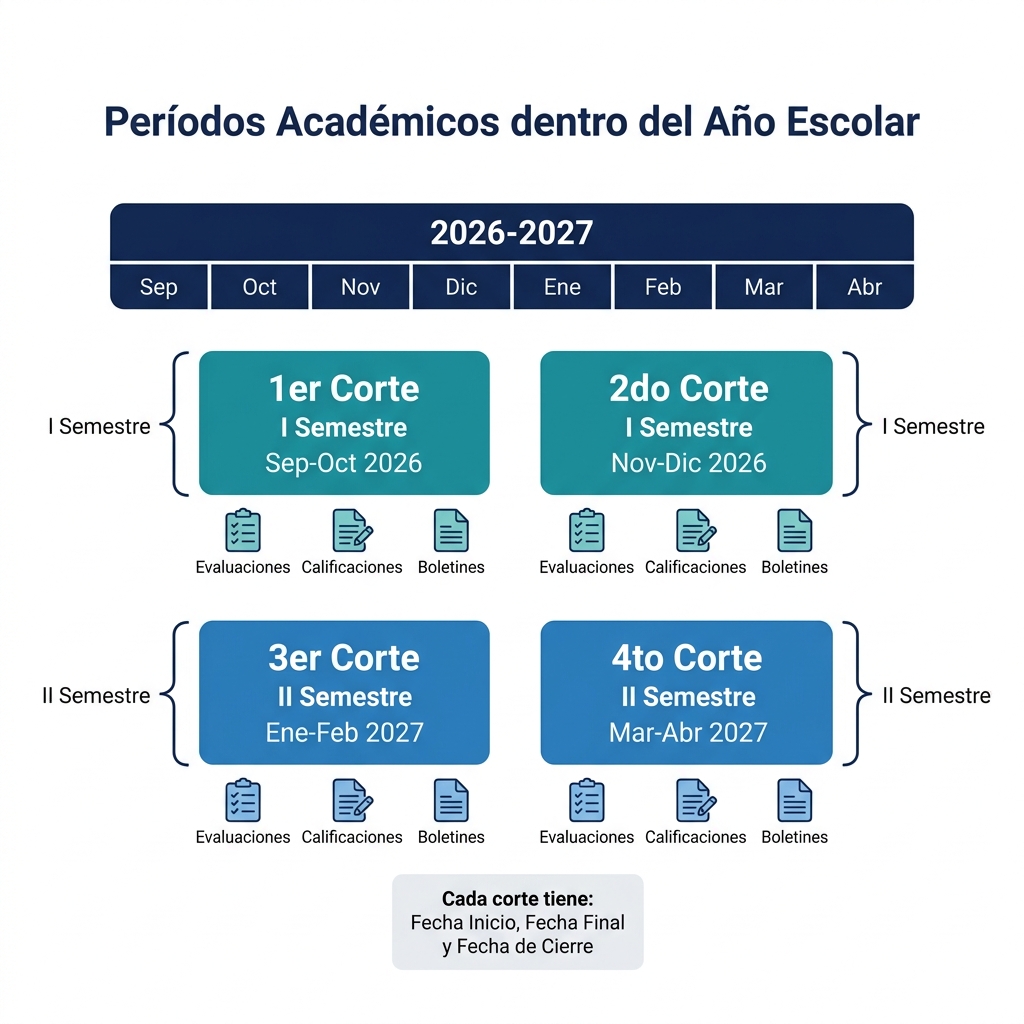
A school term (school year) is divided into several academic periods. In Nicaragua, MINED organizes the year into 4 bimonthly periods grouped into 2 semesters.
Diagram: Periods Within the School Year
The following diagram shows how academic periods are organized within the 2026-2027 school year:
Academic Periods List
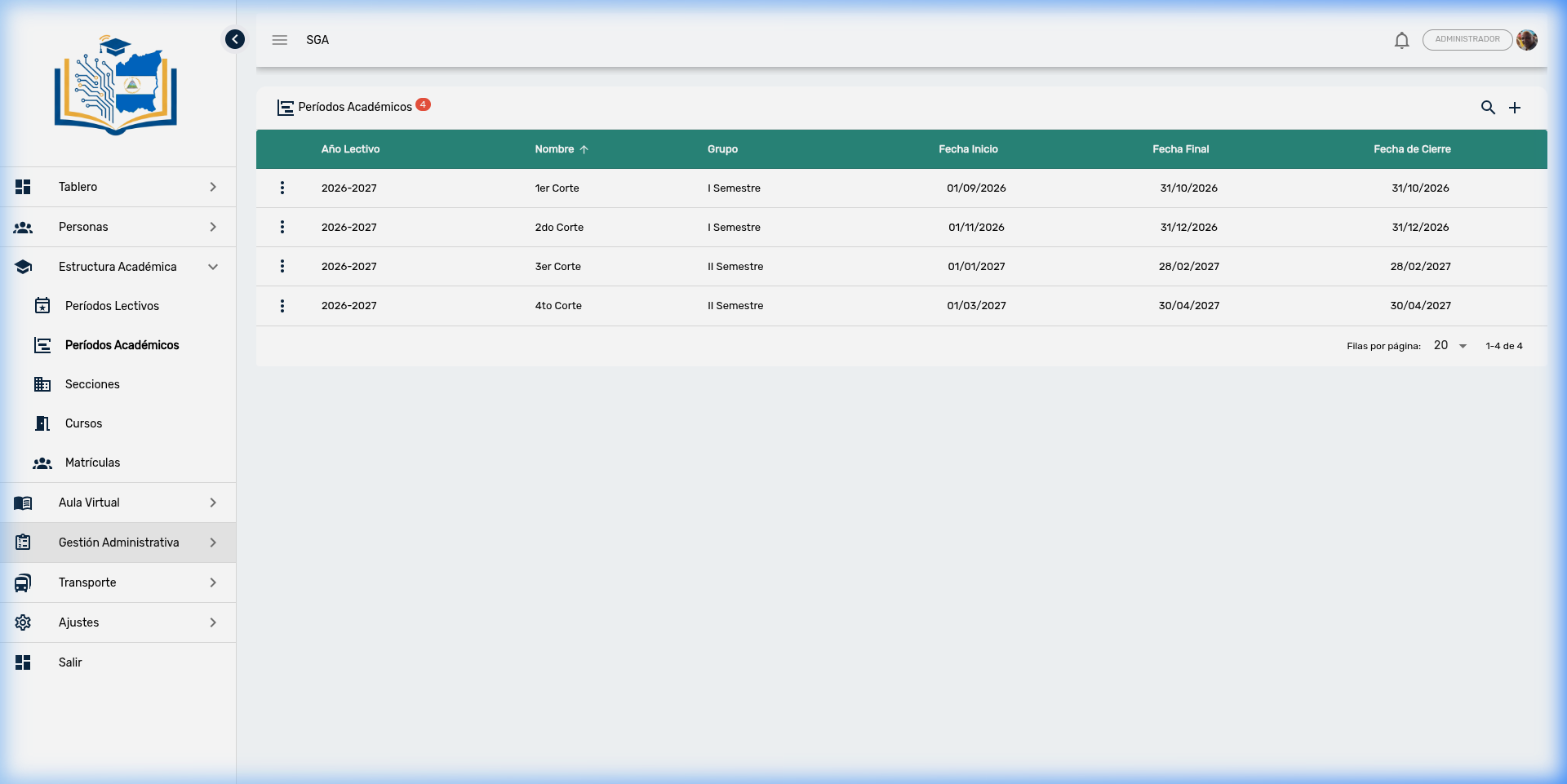
When entering the module, the table is displayed with all registered evaluation periods. The counter next to the title indicates the total.
Visible Columns
| Column | Description |
|---|---|
| School Year | School term to which the period belongs (e.g., 2026-2027) |
| Name | Period identifier (e.g., 1st Period, 2nd Period) |
| Group | Semester to which it belongs (e.g., Semester I, Semester II) |
| Start Date | First day of the evaluation period |
| End Date | Last day for academic activities of the period |
| Closing Date | Deadline for recording grades in the system |
Important
The Closing Date is different from the End Date. The End Date marks the end of academic activities, while the Closing Date is the maximum deadline for teachers to enter grades into the system. After this date, the system may lock grade editing.
Academic Period Search
To filter periods, click the search icon (🔍):
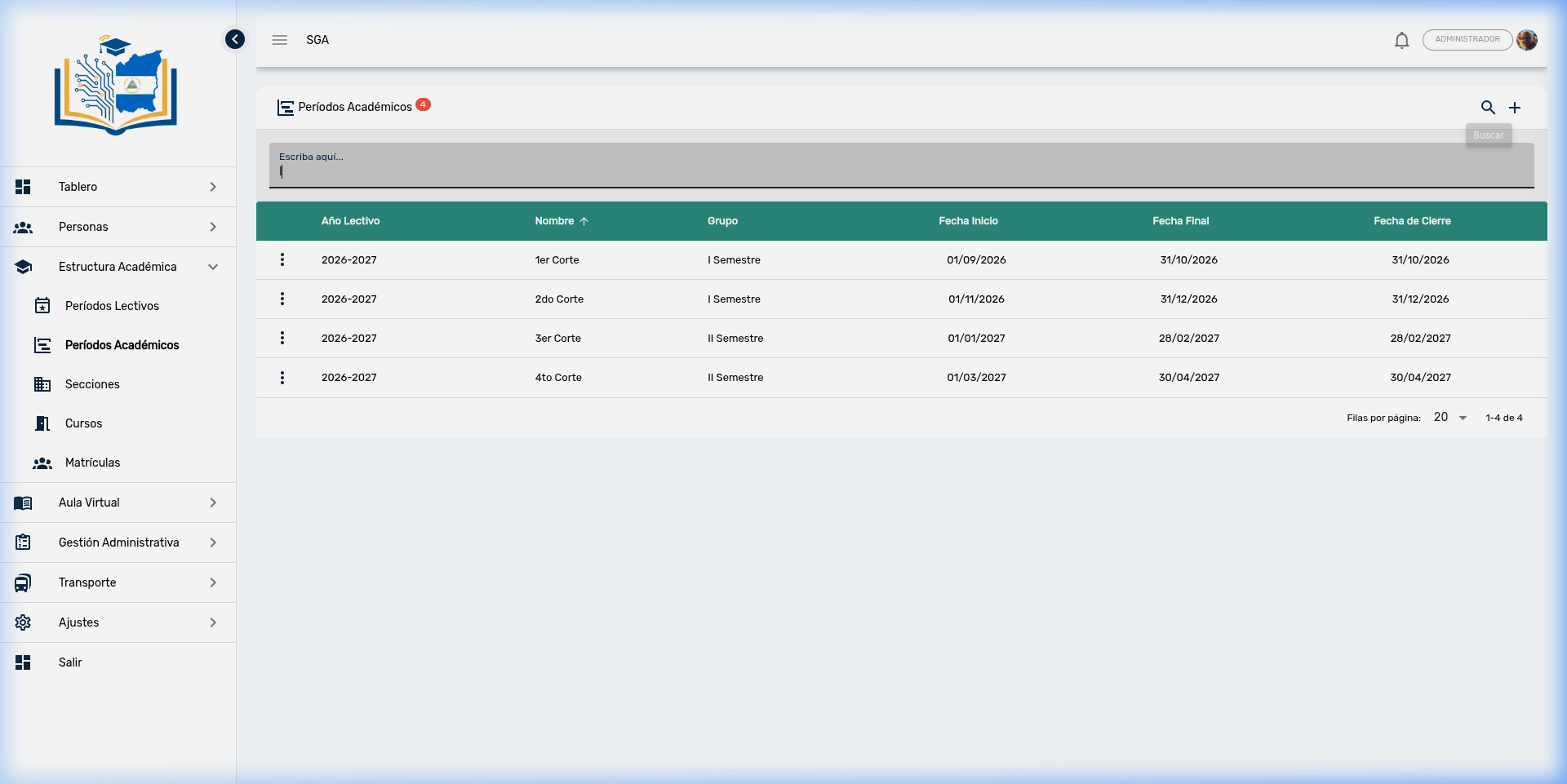
Steps to search:
- Click the search icon (🔍)
- Type the text you are looking for (period name, semester, etc.)
- The table will filter automatically
Tip
You can search by any visible column: period name, group (semester), or school year.
Actions per Academic Period
Each period has a context menu represented by three vertical dots (⋮):
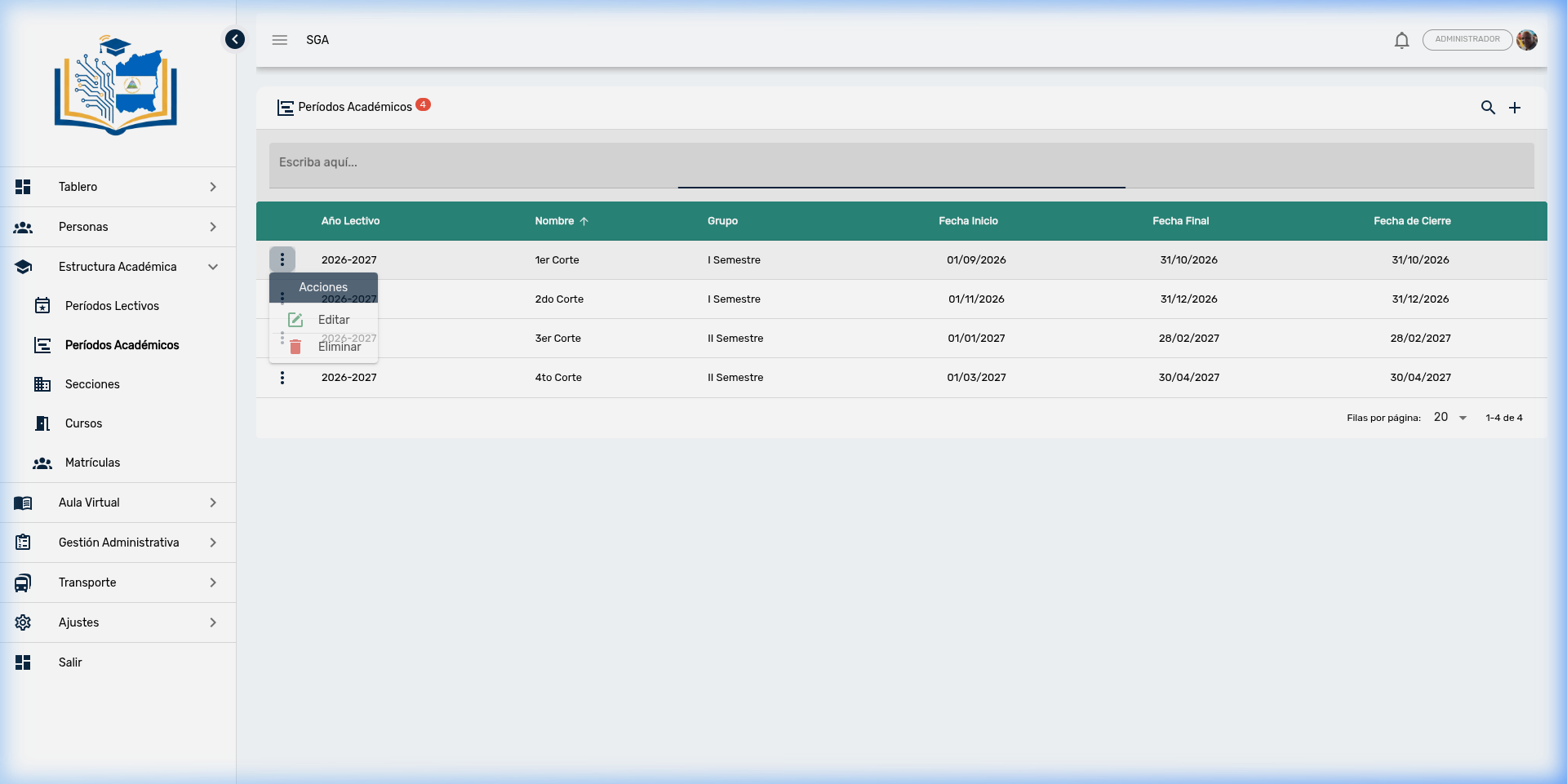
| Action | Icon | Description |
|---|---|---|
| Edit | ✏️ | Modifies the evaluation period data |
| Delete | 🗑️ | Deletes the academic period (requires confirmation) |
Important
The system does not allow deleting an academic period that has evaluations or grades recorded. If you attempt to delete it, you will receive an error message. You must first delete the evaluations linked to that period.
Edit an Academic Period
When selecting Edit, a dialog opens with the complete period data:
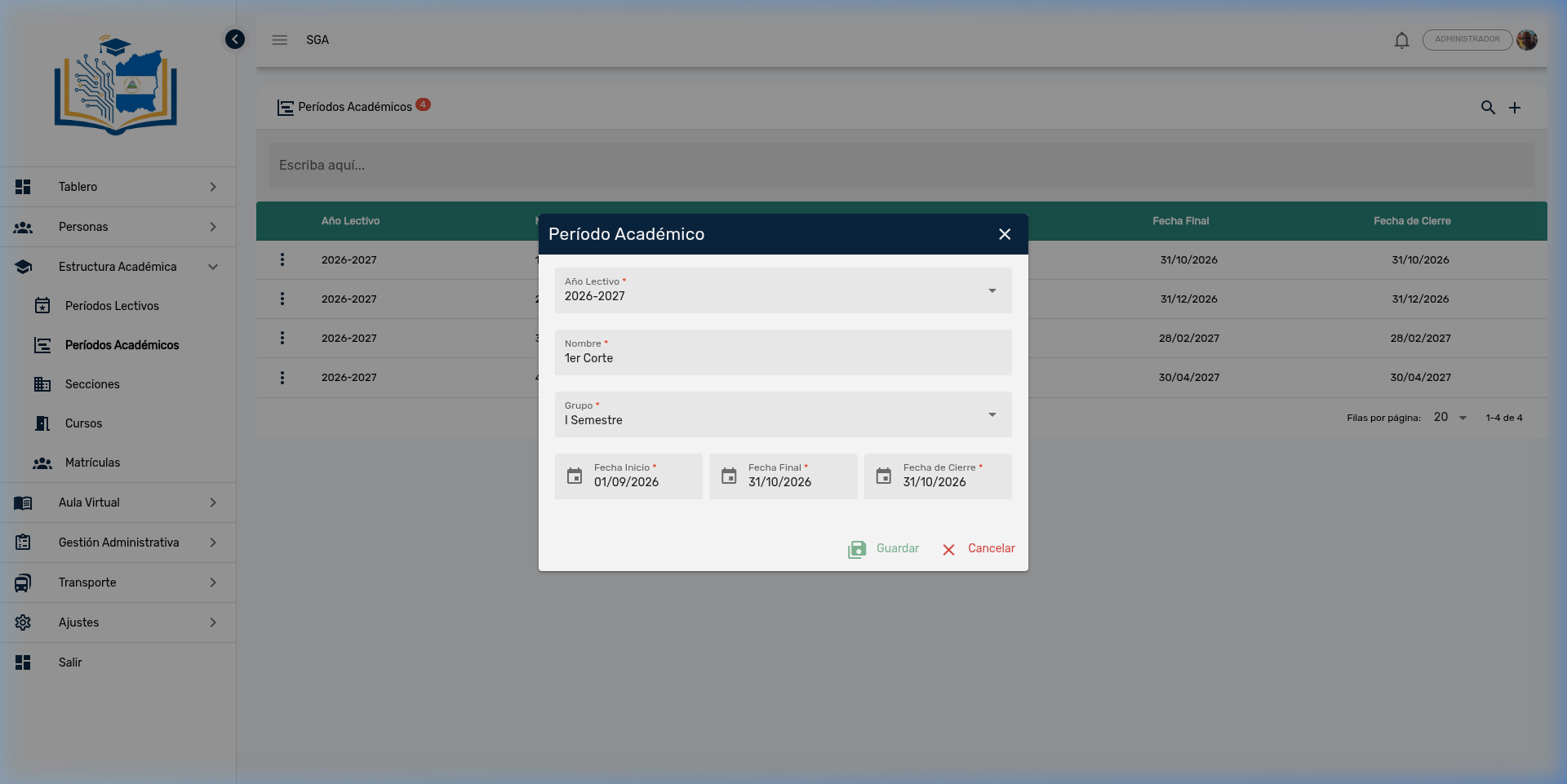
Form Fields
| Field | Type | Description | Example |
|---|---|---|---|
| School Year | Selector | Parent school term (selected from a list) | 2026-2027 |
| Name | Text | Period identifier | 1st Period |
| Group | Selector | Semester to which it belongs | Semester I |
| Start Date | Date | First day of the period | 09/01/2026 |
| End Date | Date | Last day of activities | 10/31/2026 |
| Closing Date | Date | Deadline for entering grades | 10/31/2026 |
Tip about dates
- The Start Date of a period generally coincides with the day after the End Date of the previous period.
- The Closing Date can be equal to or later than the End Date, giving teachers extra time to complete grade entry.
Create a New Academic Period
To create a new period, click the + button in the upper right corner:
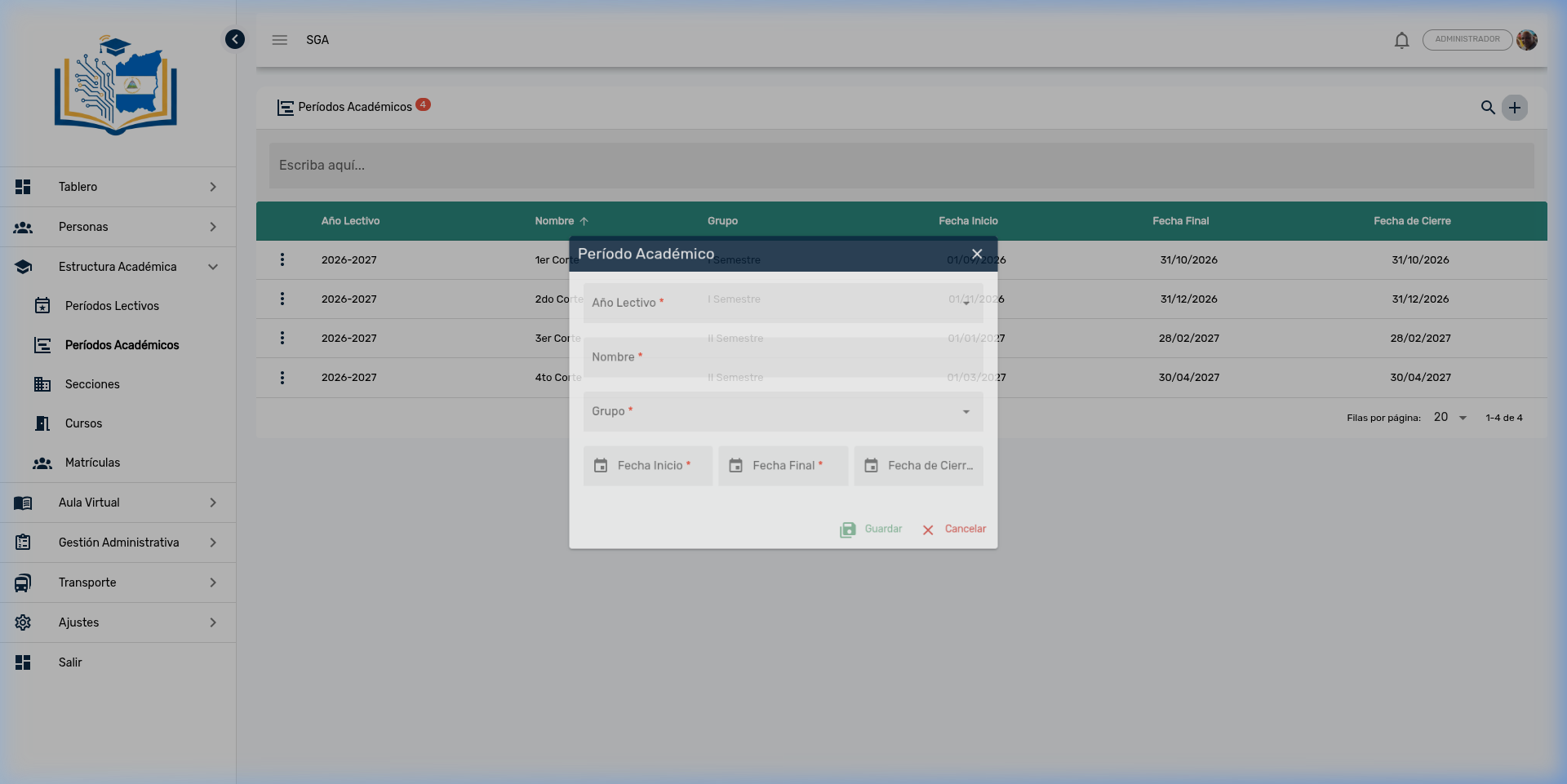
Steps to create an academic period:
- Click the + button
- Select the School Year to which it belongs
- Type the Name of the period (e.g., 1st Period)
- Select the Group (semester)
- Set the Start Date (📅)
- Set the End Date (📅)
- Set the Closing Date (📅)
- Click Save
Note
All fields marked with a red asterisk (*) are required.
Example: Complete Configuration for the 2026-2027 Year
Below is the typical academic period configuration for a school year in Nicaragua:
| Period | Group | Start Date | End Date | Closing Date |
|---|---|---|---|---|
| 1st Period | Semester I | 09/01/2026 | 10/31/2026 | 10/31/2026 |
| 2nd Period | Semester I | 11/01/2026 | 12/31/2026 | 12/31/2026 |
| 3rd Period | Semester II | 01/01/2027 | 02/28/2027 | 02/28/2027 |
| 4th Period | Semester II | 03/01/2027 | 04/30/2027 | 04/30/2027 |
Tip
This bimonthly distribution is the most common, but the SGA is flexible. You can configure trimesters, quadmesters, or any other distribution your institution requires.
Navigation Summary — Academic Periods
| Element | Location | Function |
|---|---|---|
| 🔍 Search | Upper right corner | Search for academic periods |
| ➕ Add | Upper right corner | Create new academic period |
| ⋮ Three dots | Beginning of each row | Actions: Edit, Delete |
| 💾 Save | Inside the dialog | Confirm creation or editing |
| ✕ Cancel | Inside the dialog | Discard changes |
Module Navigation
| Path | Description |
|---|---|
| Academic Structure | Module overview |
| Sections | Grades and class groups |
| Courses | Subjects, teachers, and grading types |
| Enrollments | Student enrollment |