

Courses (Academic Assignment)
What is a Course?
A Course is the unit that connects a subject with a section, a teacher, and a grading type within a school year. It is the central element of academic planning: without courses it is not possible to register schedules, take attendance, apply evaluations, or generate grades.
Example: The course "Mathematics — 7th A — Prof. María del Socorro — Quantitative" indicates that Professor María del Socorro teaches Mathematics in the 7th A section and that grades are recorded numerically.
Access path: Side menu → Academic Structure → Courses
List View
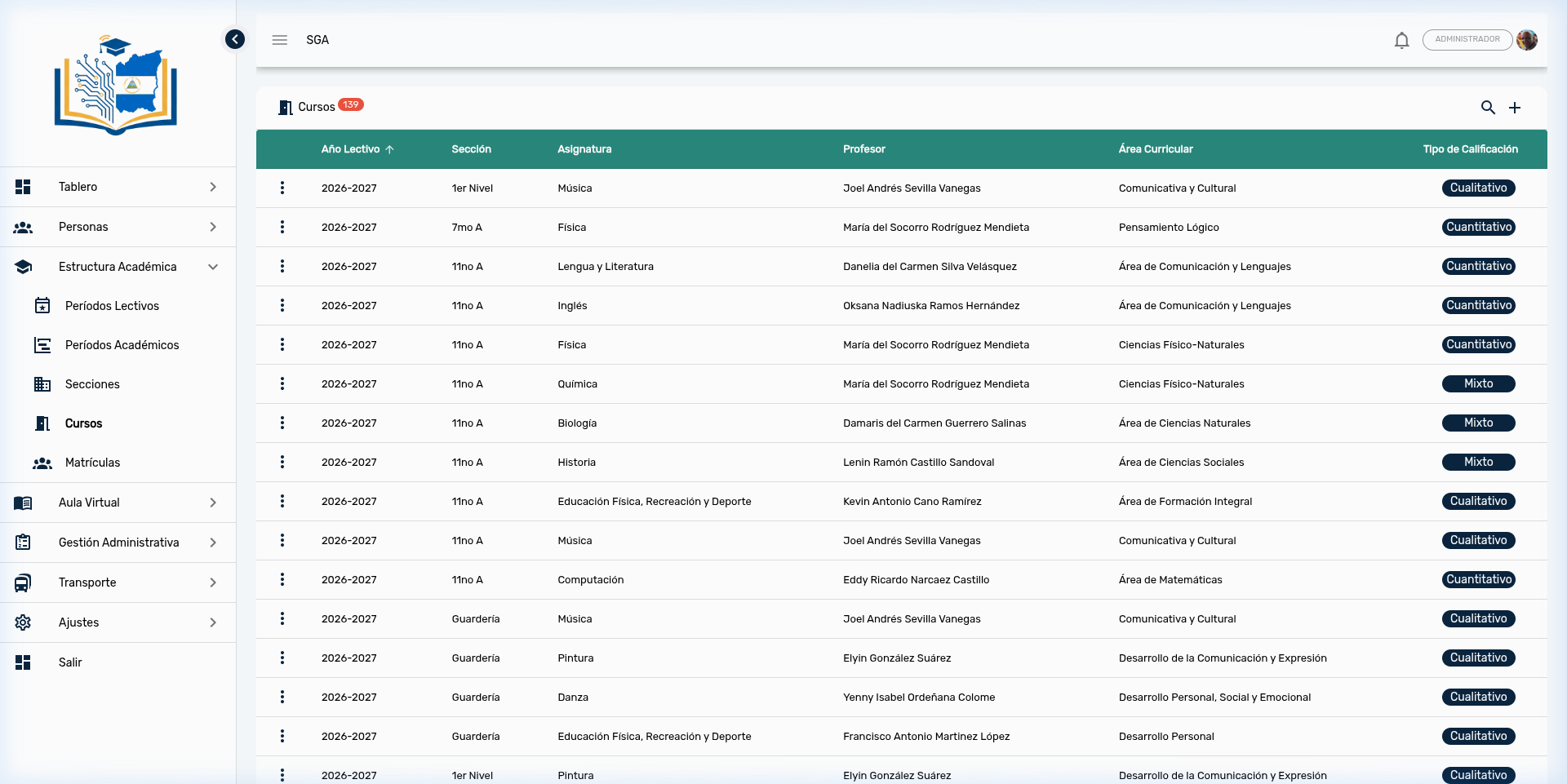
When entering the module, the system displays a table with all registered courses. Each row shows:
| Column | Description |
|---|---|
| School Year | School term to which the course belongs (e.g., 2026-2027) |
| Section | Assigned class group (e.g., 7th A, 11th A, Nursery) |
| Subject | Subject being taught (e.g., Mathematics, Physics, Music) |
| Teacher | Teacher responsible for the course |
| Curricular Area | Curricular classification of the subject (e.g., Physical-Natural Sciences) |
| Grading Type | Evaluation mode: Quantitative, Qualitative, or Mixed |
Note
The counter at the top (e.g., 139) indicates the total number of courses registered in the system.
Search and Filters
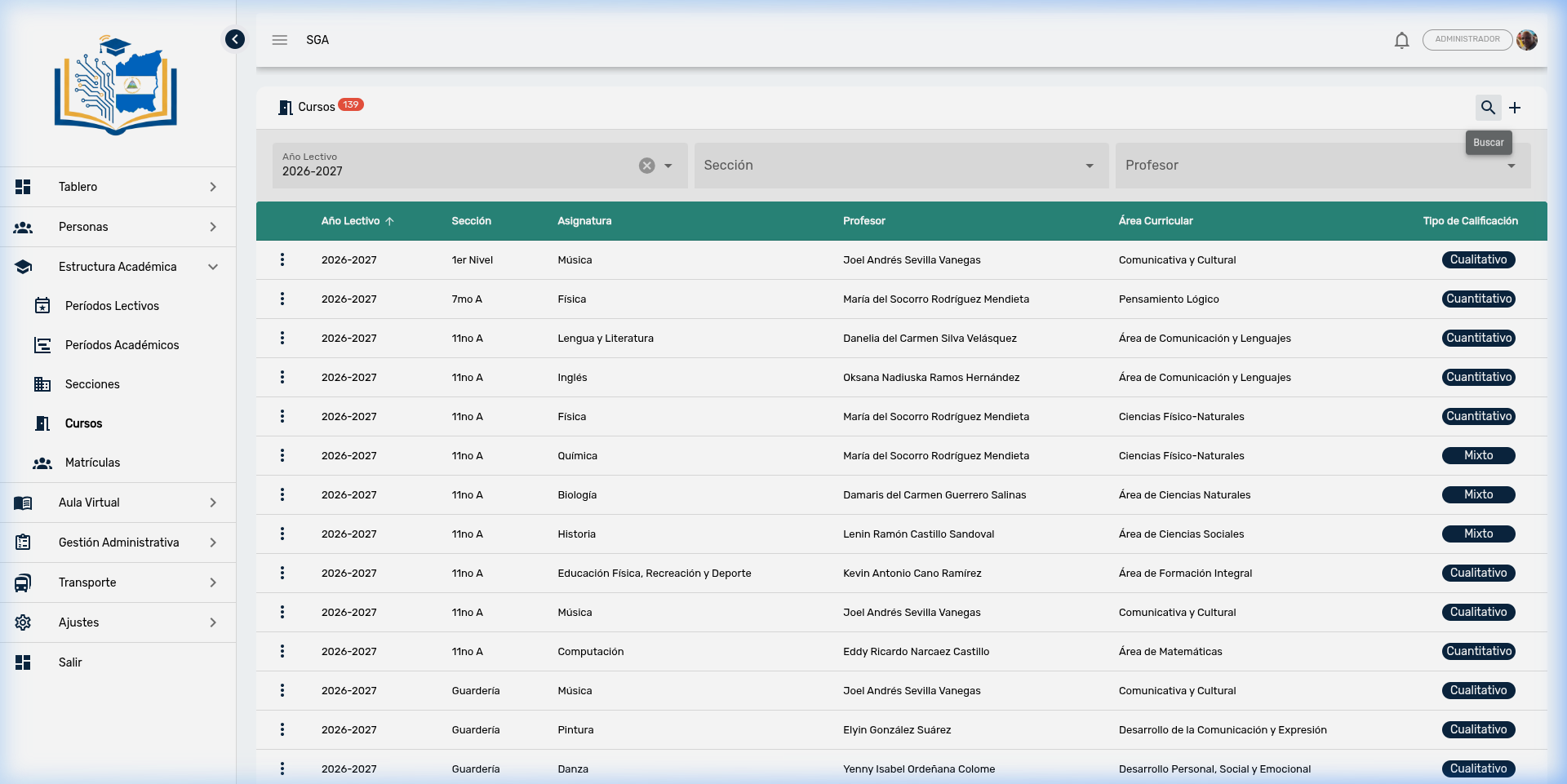
To locate a specific course, click the search icon (🔍) in the upper right corner. A bar will appear with three combinable filters:
| Filter | Type | Function |
|---|---|---|
| School Year | Selector | Filter by school term |
| Section | Selector | Filter by class group |
| Teacher | Selector | Filter by responsible teacher |
Tip
Filters work in combination. For example, you can select School Year 2026-2027 and Section 11th A to see only the eleventh grade A courses for the current term.
Actions per Course
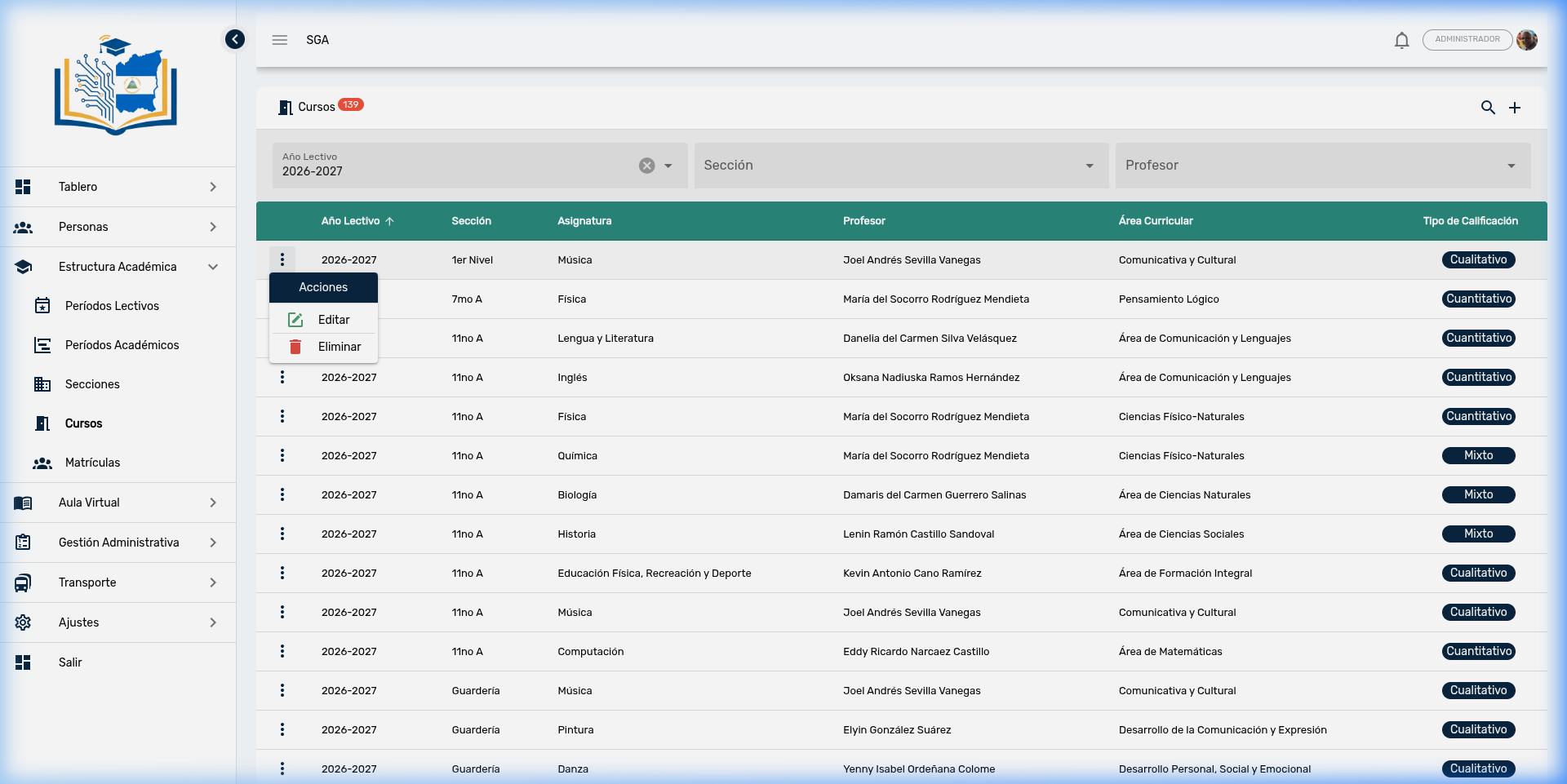
Each table row has an actions menu accessible through the three vertical dots icon (⋮):
| Action | Icon | Description |
|---|---|---|
| Edit | ✏️ | Modifies course data |
| Delete | 🗑️ | Deletes the course (requires confirmation) |
Important
The system does not allow deleting a course that has attendance records, evaluations, grades, schedules, or incidents registered. If you attempt to delete it, you will receive an error message. You must first delete the records linked to the course.
Note
When deleting a course, the Virtual Classroom activities associated with that course are automatically deleted, as they are content exclusive to the class.
Create a New Course
- Click the + button (upper right corner).
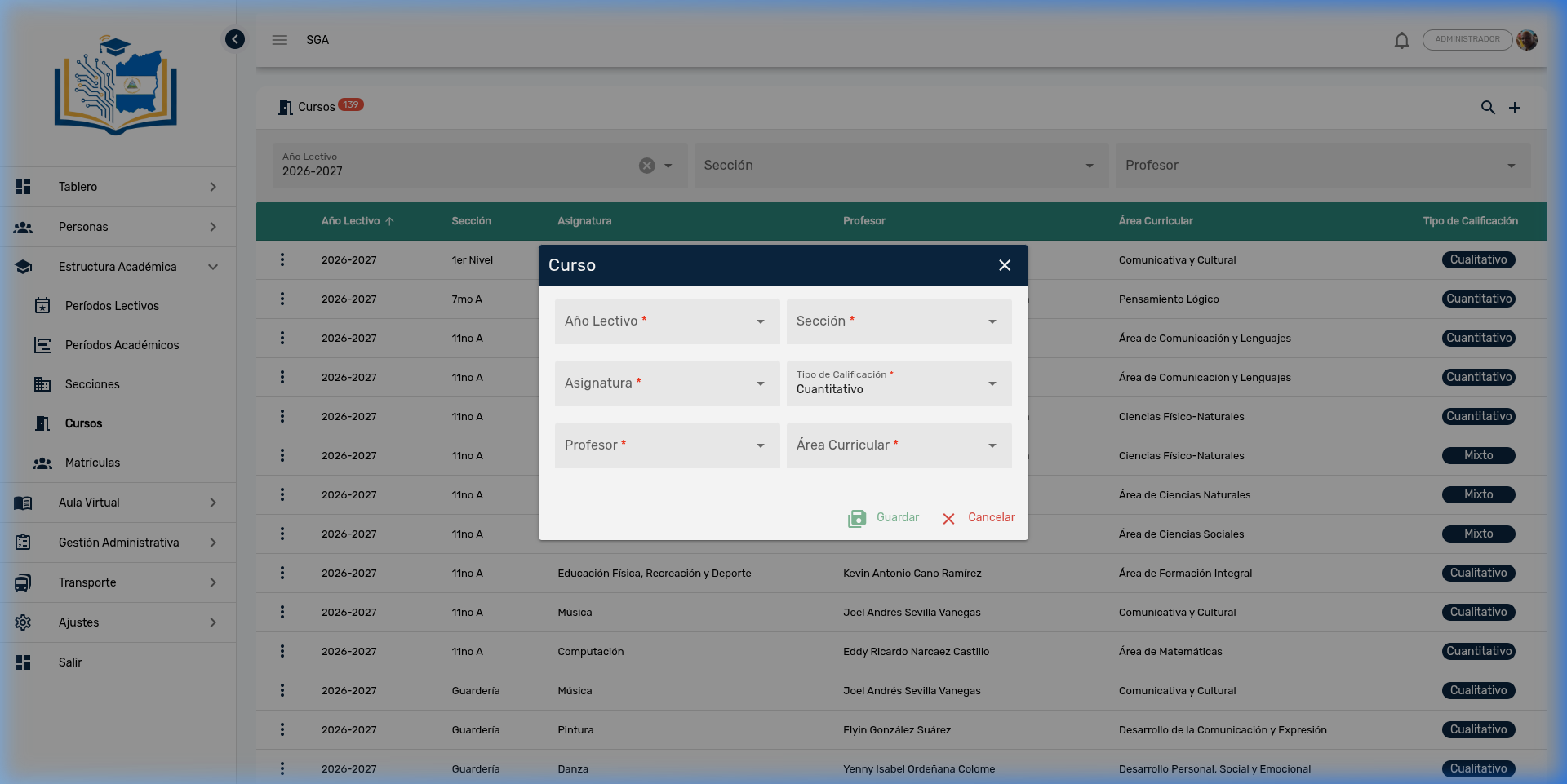
- Complete the form with the following fields:
| Field | Required | Description |
|---|---|---|
| School Year | ✅ | Select the school term |
| Section | ✅ | Select the class group (depends on the selected School Year) |
| Subject | ✅ | Select the subject to teach |
| Grading Type | ✅ | Evaluation mode: Quantitative, Qualitative, or Mixed |
| Teacher | ✅ | Select the responsible teacher |
| Curricular Area | ✅ | Curricular classification of the subject |
Tip
The Section field is enabled after selecting a School Year, since sections are associated with a specific school term. This behavior is known as a cascade selector.
- Click Save (💾) to register the course, or Cancel (✕) to discard.
Edit an Existing Course
- Locate the course in the table.
- Click the three dots icon (⋮) → Edit.
- The form will open with the current course data.
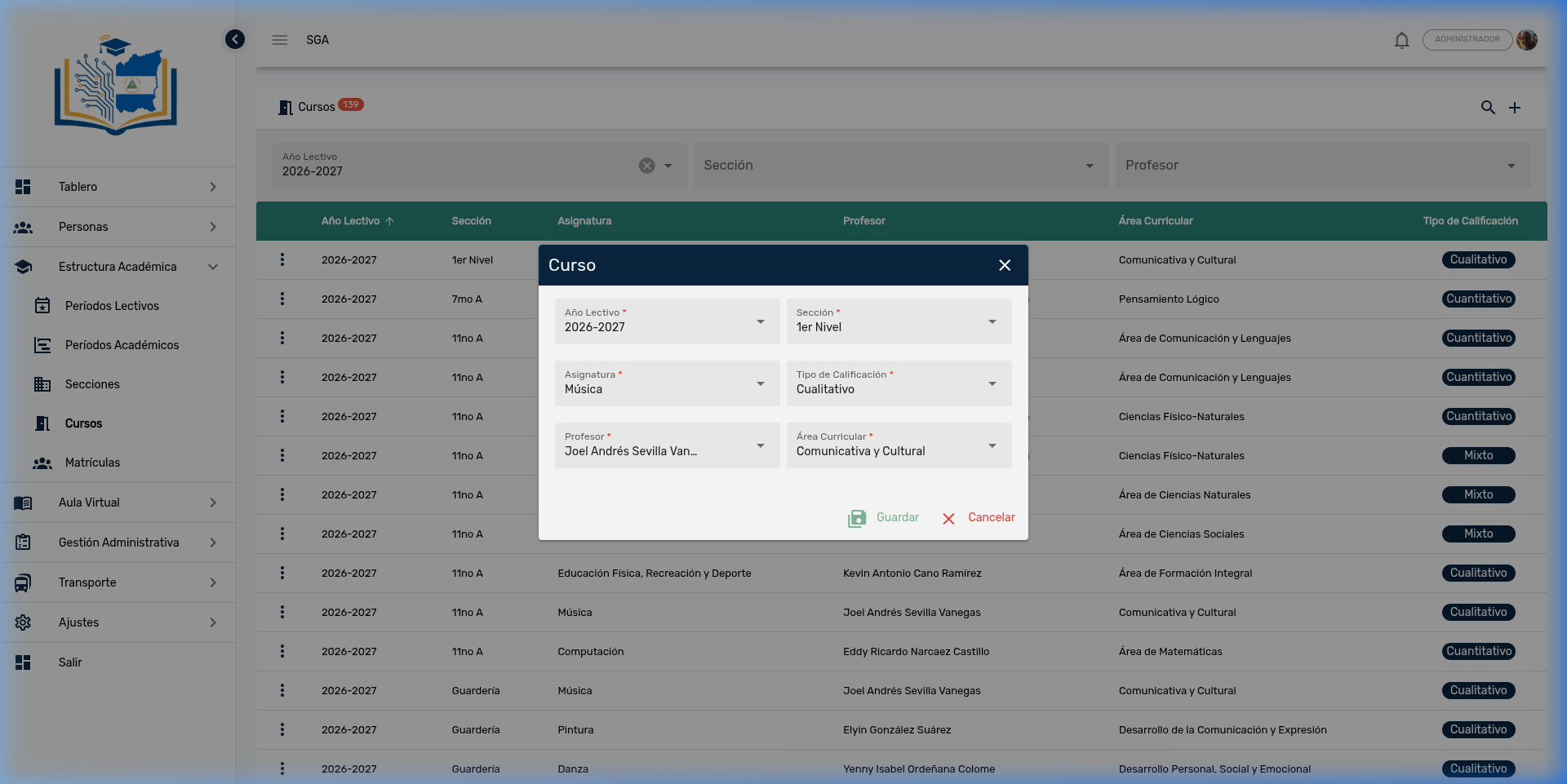
- Modify the necessary fields and click Save (💾).
Note
Changing the Teacher of a course does not affect already recorded grades or attendance. It only updates who is the responsible teacher from that point forward.
Grading Types — Complete Guide
The Grading Type is one of the most important fields when creating a course. This decision defines how the teacher will create evaluations, how they will capture each student's grades, and what type of results will appear on academic report cards. Once a course has recorded evaluations, changing the grading type is not recommended, as it could create inconsistencies in existing data.
The system supports three evaluation modes, aligned with the regulations of the Ministry of Education (MINED) of Nicaragua:
| Type | How is it evaluated? | Final result | Levels that use it |
|---|---|---|---|
| Qualitative | Descriptive assessments per criterion | Scale code (e.g., AA, AS, AF) | Early Education and Regular Primary (1st–2nd) |
| Quantitative | Numerical scores per criterion | Numerical sum (e.g., 85/100) | Custom configuration |
| Mixed | Descriptive assessments per criterion | Automatically calculated numerical grade | Regular Primary (3rd–6th) and Secondary (7th–11th) |
MINED Assessment Scales
The system includes official assessment scales configured by educational level and grade. Each scale has a code, a descriptive name, and a weight that determines its numerical equivalence.
Early Education (Nursery, 1st Level, 2nd Level, 3rd Level)
Early education uses a simplified qualitative two-level scale, focused on observing the child's learning process without numerical pressure:
| Code | Name | Weight | Pedagogical Meaning |
|---|---|---|---|
| AA | Advanced Learning | 1.00 | The child demonstrates mastery of the competencies expected for their age |
| AP | Learning in Progress | 0.40 | The child is developing competencies and requires continuous support |
Note
In Early Education, no numerical scores or grade ranges are assigned. The evaluation is based on the teacher's direct observation of the child's overall development. Only two assessments are possible.
Regular Primary — 1st and 2nd Grade
The first primary grades use a three-level qualitative scale, appropriate for the transition stage between early and formative education:
| Code | Name | Weight | Pedagogical Meaning |
|---|---|---|---|
| AA | Advanced Learning | 1.00 | The student exceeds the competencies expected for the grade |
| AS | Satisfactory Learning | 0.80 | The student achieves the expected competencies |
| AF | Fundamental Learning | 0.60 | The student is in the process of reaching basic competencies |
Note
The difference from Early Education is the addition of the intermediate level AS (Satisfactory Learning), which allows the teacher to differentiate between students who achieve expectations and those who still need reinforcement.
Regular Primary — 3rd to 6th Grade
Starting from 3rd Grade, MINED incorporates numerical ranges associated with each code, which enables the use of Mixed mode in the system:
| Code | Name | Weight | Grade Range |
|---|---|---|---|
| AA | Advanced Learning | 1.00 | 90 – 100 |
| AS | Satisfactory Learning | 0.80 | 76 – 89 |
| AF | Fundamental Learning | 0.60 | 60 – 75 |
| AI | Initial Learning | 0.40 | 0 – 59 |
Note
This is where the AI (Initial Learning) code appears for the first time, indicating that the student has not reached the minimum competencies. In MINED practice, an AI grade (below 60) is equivalent to a failed subject.
Secondary — 7th to 11th Grade
Secondary education maintains the same four-level scale with numerical ranges identical to those of upper Primary:
| Code | Name | Weight | Grade Range |
|---|---|---|---|
| AA | Advanced Learning | 1.00 | 90 – 100 |
| AS | Satisfactory Learning | 0.80 | 76 – 89 |
| AF | Fundamental Learning | 0.60 | 60 – 75 |
| AI | Initial Learning | 0.40 | 0 – 59 |
Tip
Scales are configured by School Year, Educational Level, and Grade. This allows the school to adjust the ranges or codes according to MINED provisions for each school term, without needing to modify the system.
Qualitative — Descriptive Evaluation
In Qualitative mode, the teacher evaluates without numbers, using only the assessment scale codes. This is the appropriate mode for levels where MINED does not establish numerical grades.
When defining the evaluation:
- Each criterion has only a name (e.g., "Oral expression", "Fine motor skills").
- The score field remains hidden to avoid confusion.
When capturing grades:
- The teacher selects a scale code (AA, AP for Early Education; AA, AS, AF for 1st–2nd) for each criterion of each student.
- The final result is also a descriptive code — no numerical calculations are performed.
Practical example — 1st Level (Early Education):
| Evaluation: "Development Observation — Period I" | |
|---|---|
| Criterion 1: Oral and gestural expression | |
| Criterion 2: Socialization with peers | |
| Criterion 3: Gross motor skills |
| Student | Oral expression | Socialization | Motor skills | Result |
|---|---|---|---|---|
| Sofía Ramírez | AA | AA | AP | AA |
| Pedro Sánchez | AP | AA | AP | AP |
In this example, Sofía shows Advanced Learning in two of three areas. Pedro requires more support in oral expression and motor skills.
Practical example — 2nd Grade (Regular Primary):
| Evaluation: "Literacy — Period II" | |
|---|---|
| Criterion 1: Fluent oral reading | |
| Criterion 2: Simple sentence writing | |
| Criterion 3: Reading comprehension |
| Student | Oral reading | Writing | Comprehension | Result |
|---|---|---|---|---|
| María López | AA | AS | AA | AA |
| Carlos Mejía | AF | AS | AF | AF |
María achieves an overall Advanced Learning. Carlos is at Fundamental Learning — the teacher should plan reinforcement activities.
Note
This mode is mandatory for Early Education (Nursery to 3rd Level) and recommended for 1st and 2nd Grade Primary, in accordance with MINED guidelines that prioritize formative assessment in the early stages of learning.
Quantitative — Numerical Evaluation
In Quantitative mode, the teacher works exclusively with numerical values:
When defining the evaluation:
- Each criterion has a name and a maximum score.
- The total evaluation score is automatically calculated as the sum of the maximum scores of all criteria.
When capturing grades:
- The teacher enters a number for each criterion of each student.
- The system does not allow a criterion's grade to exceed its maximum score (automatic validation).
- The final result is automatically calculated as the sum of the criteria.
Practical example — 9th Grade, Mathematics:
| Evaluation: "Midterm Exam — Quadratic Equations" | Maximum Score |
|---|---|
| Criterion 1: Problem solving | 40 |
| Criterion 2: Algebraic formulation | 35 |
| Criterion 3: Graphical analysis | 25 |
| Evaluation total | 100 |
| Student | Problem solving (max: 40) | Formulation (max: 35) | Analysis (max: 25) | Result |
|---|---|---|---|---|
| Ana López | 38 | 30 | 22 | 90 (AA) |
| Carlos Mejía | 25 | 20 | 15 | 60 (AF) |
Ana scores 90 points, placing her in the Advanced Learning range (90–100). Carlos scores 60 points, placing him in Fundamental Learning (60–75).
Tip
The final result is read-only — it is automatically calculated in real time as the teacher enters each individual grade. If a teacher tries to enter 45 in a criterion with a maximum of 40, the system will automatically adjust it to 40.
Mixed — Descriptive Evaluation with Numerical Result
The Mixed mode is the most widely used mode in the system and the one that most closely aligns with MINED's evaluation practice for upper Primary (3rd–6th) and all of Secondary. It combines the descriptive clarity of official codes with the numerical precision needed for report cards and academic consolidation reports.
When defining the evaluation:
- Each criterion has a name and a maximum score (same as Quantitative).
- The total evaluation score is explicitly defined.
When capturing grades:
- The teacher selects a scale code (AA, AS, AF, AI) for each criterion.
- The system automatically calculates a final numerical result using the weights associated with each code.
Calculation formula:
Result = (Average of Criteria Weights) × Total Evaluation ScoreOfficial weight table (3rd Grade to 11th Grade):
| Code | Name | Weight | If the evaluation is worth 100 |
|---|---|---|---|
| AA | Advanced Learning | 1.00 | 100.00 |
| AS | Satisfactory Learning | 0.80 | 80.00 |
| AF | Fundamental Learning | 0.60 | 60.00 |
| AI | Initial Learning | 0.40 | 40.00 |
Practical example — 8th Grade, Natural Sciences:
| Evaluation: "Integrative Project — Ecosystems of Nicaragua" | Score: 100 |
|---|---|
| Criterion 1: Bibliographic research | |
| Criterion 2: Oral presentation to the class | |
| Criterion 3: Teamwork |
| Student | Research | Presentation | Teamwork | Average Weight | Result |
|---|---|---|---|---|---|
| María Torres | AA (1.00) | AS (0.80) | AA (1.00) | 0.93 | 93.33 |
| Luis Gómez | AF (0.60) | AI (0.40) | AS (0.80) | 0.60 | 60.00 |
María's calculation: (1.00 + 0.80 + 1.00) ÷ 3 = 0.9333 → 0.9333 × 100 = 93.33 → Range: AA
Luis's calculation: (0.60 + 0.40 + 0.80) ÷ 3 = 0.60 → 0.60 × 100 = 60.00 → Range: AF
Tip
Mixed mode is the MINED standard for 3rd to 6th Grade Primary and all of Secondary (7th to 11th). It allows the teacher to evaluate using the official descriptors (AA, AS, AF, AI) while the system automatically generates the numerical grade for report cards and consolidation reports.
Summary: Which Type to Use by Grade?
| Educational Level | Grades | Recommended Type | Available Codes |
|---|---|---|---|
| Early Education | Nursery, 1st–3rd Level | Qualitative | AA, AP |
| Regular Primary | 1st and 2nd Grade | Qualitative | AA, AS, AF |
| Regular Primary | 3rd to 6th Grade | Mixed | AA, AS, AF, AI |
| Secondary | 7th to 11th Grade | Mixed | AA, AS, AF, AI |
Technical Comparison of the Three Modes
| Feature | Quantitative | Qualitative | Mixed |
|---|---|---|---|
| Grade input | Number | Code (AA, AS, AF, AP) | Code (AA, AS, AF, AI) |
| Final result | Numerical sum | Descriptive code | Calculated number |
| Score per criterion | ✅ Required | ❌ Not applicable | ✅ Required |
| Assessment scale | ❌ Not applicable | ✅ Required | ✅ Required |
| Automatic calculation | Direct sum | No calculation | Weighted average × score |
| Recommended MINED level | Free configuration | Early and lower Primary | Upper Primary and Secondary |
Important
The grading type directly affects the format of report cards and academic consolidation reports. A Quantitative course will show numerical grades in the report, while a Qualitative course will show the MINED descriptive codes. Make sure to select the correct type before you start recording evaluations.
Relationship Between Courses and Other Modules
The course is the central element that connects multiple system functionalities:
| Module | Relationship with the Course |
|---|---|
| Schedules | Each schedule block is associated with a course (subject + section + teacher) |
| Attendance | Attendance is recorded per course: each student has a status per class |
| Evaluations | Evaluations and grades are defined and captured within a course |
| Incidents | Disciplinary reports can be linked to a specific course |
| Virtual Classroom | Activities, resources, and materials are organized by course |
Navigation Summary — Courses
| Element | Location | Function |
|---|---|---|
| 🔍 Search | Upper right corner | Activate search bar and filters |
| ➕ Add | Upper right corner | Create new course |
| School Year | Search bar (left) | Filter by school term |
| Section | Search bar (center) | Filter by class group |
| Teacher | Search bar (right) | Filter by teacher |
| ⋮ Three dots | Beginning of each row | Actions: Edit, Delete |
| 💾 Save | Inside the dialog | Confirm creation or editing |
| ✕ Cancel | Inside the dialog | Discard changes |
Module Navigation
| Path | Description |
|---|---|
| Academic Structure | Module overview |
| Periods | School terms and evaluation periods |
| Sections | Grades and class groups |
| Enrollments | Student enrollment |