

Sections (Class Groups)
Sections represent the class groups within the educational institution. Each section groups students of a specific grade under the responsibility of a Homeroom Teacher and in an assigned Classroom.
Access path: Side menu → Academic Structure → Sections
Key Concept
A section is the fundamental organizational unit of the school. Examples: 7th A, 7th B, 11th A. Each section belongs to a grade, has an assigned classroom, and a responsible teacher (Homeroom Teacher).
Sections List
When entering the module, the table is displayed with all registered sections. The counter next to the title indicates the total (e.g., 18 sections).
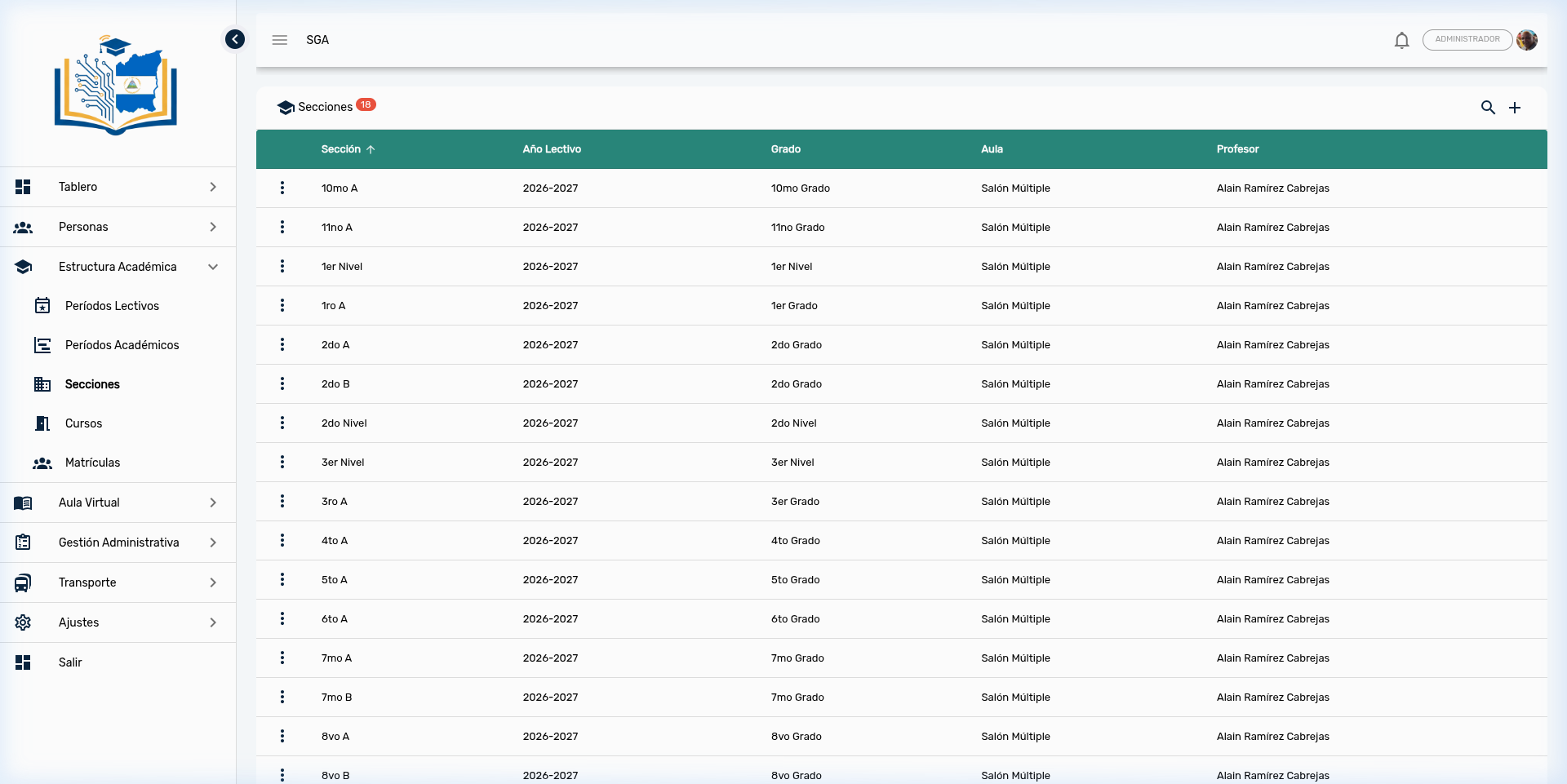
Visible Columns
| Column | Description |
|---|---|
| Section | Group identifier name (e.g., 7th A, 11th A, 1st Level) |
| School Year | School term to which it belongs (e.g., 2026-2027) |
| Grade | Academic level of the section (e.g., 7th Grade, 11th Grade, 1st Level) |
| Classroom | Physical space assigned to the section (e.g., Multi-Purpose Hall) |
| Teacher | Teacher assigned as Homeroom Teacher |
Note
The Section column is sorted alphabetically by default (indicated by the ↑ arrow). You can click on any column header to change the sort order.
Section Search and Filtering
The Sections module offers an advanced search system with three simultaneous filtering tools:
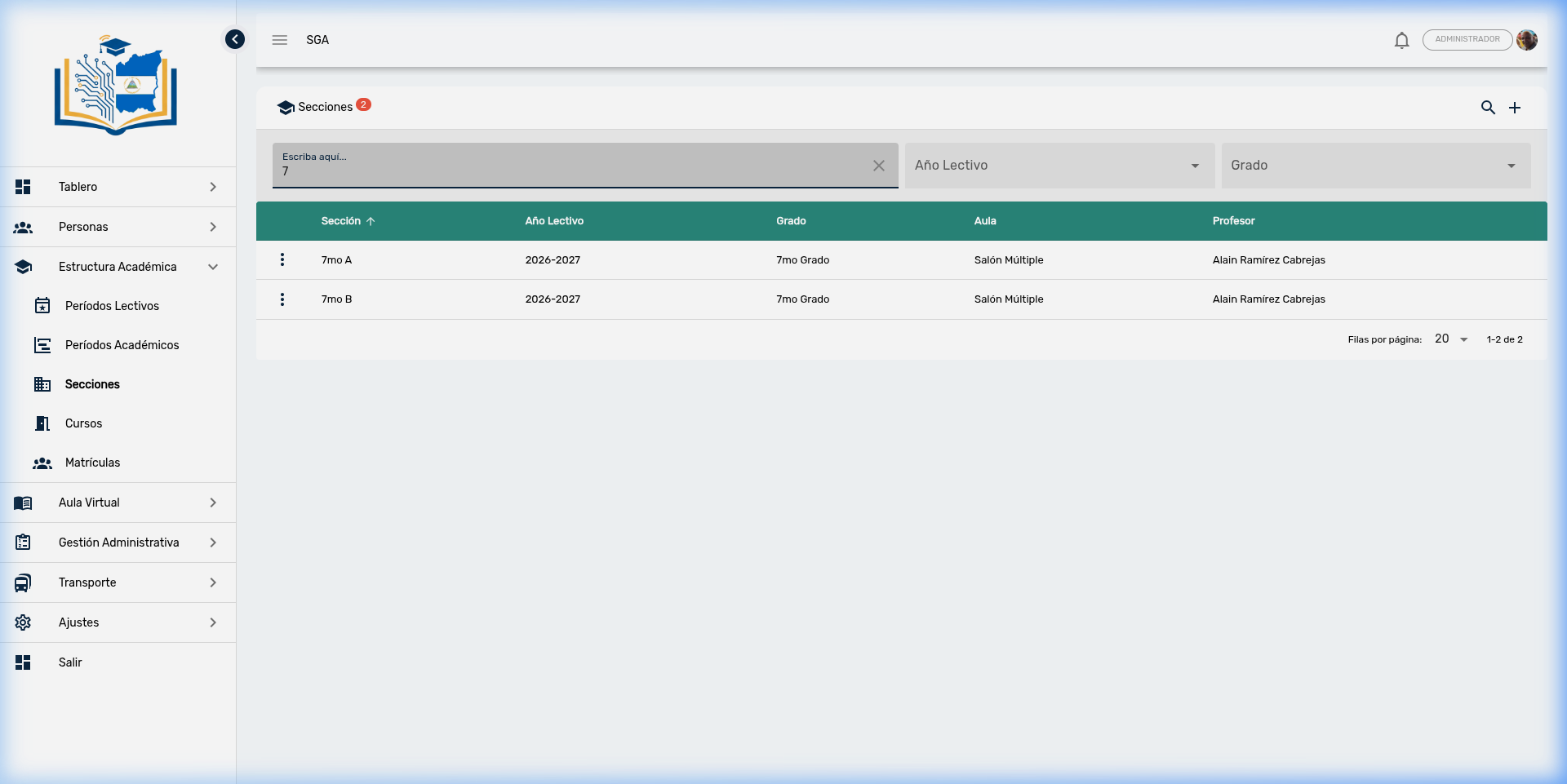
Available Search Tools
| Tool | Location | Function |
|---|---|---|
| Text field | Left | Free search by section name |
| School Year filter | Center | Dropdown selector to filter by school term |
| Grade filter | Right | Dropdown selector to filter by educational level |
Steps to search:
- Click the search icon (🔍) to activate the search bar
- Type in the text field (e.g., "7") to search by name
- Optionally, select a School Year and/or Grade to refine results
- The table will filter automatically
Tip
You can combine all three filters simultaneously. For example: searching for "A" + School Year "2026-2027" + Grade "7th Grade" will show only 7th grade sections containing "A" in their name.
Actions per Section
Each section has a context menu represented by three vertical dots (⋮):
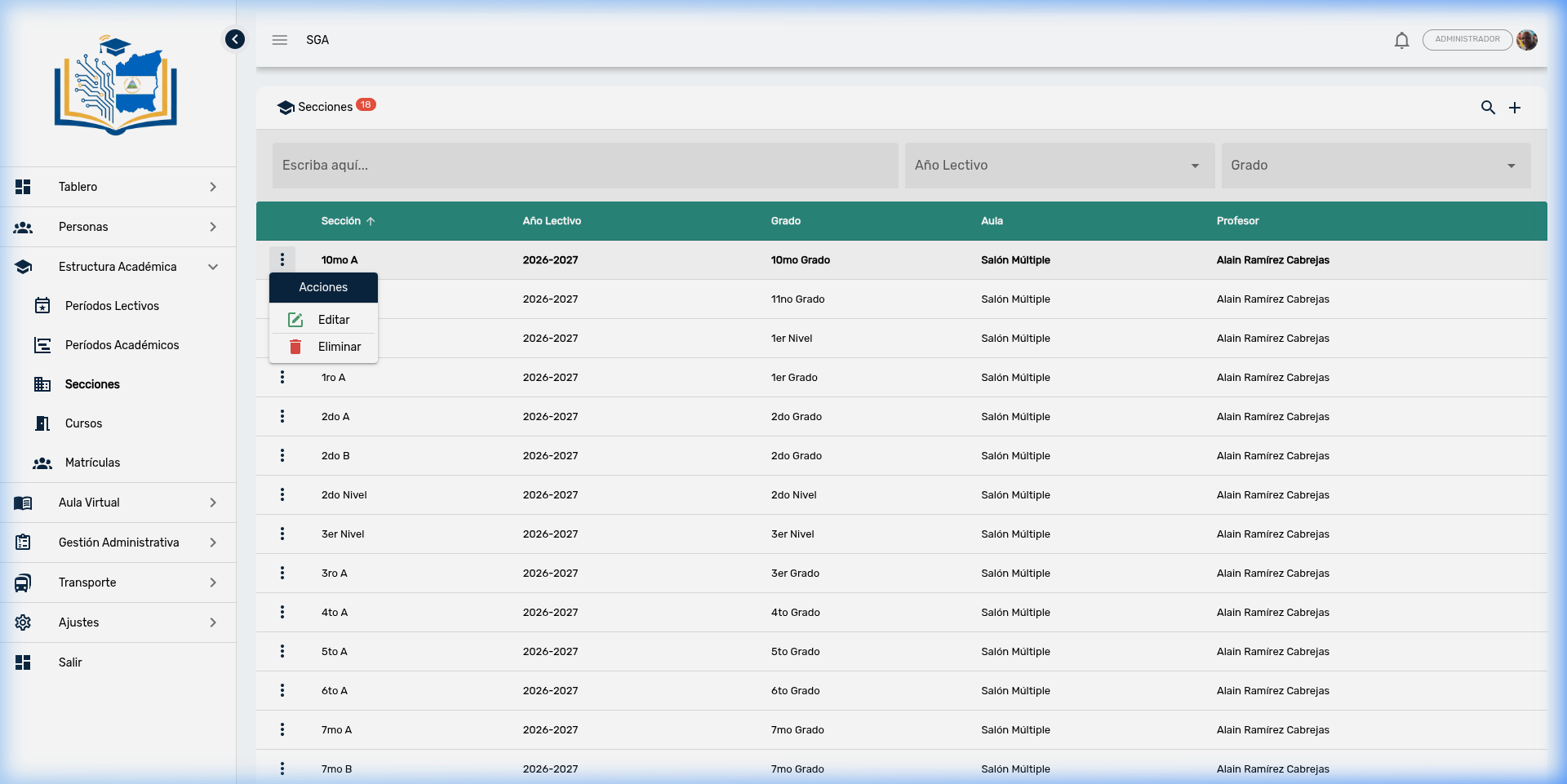
| Action | Icon | Description |
|---|---|---|
| Edit | ✏️ | Modifies section data |
| Delete | 🗑️ | Deletes the section (requires confirmation) |
Important
The system does not allow deleting a section that has courses, enrollments, evaluations, or schedules associated with it. If you attempt to delete a section with dependencies, you will receive an error message. You must first reassign or delete the linked records before deleting the section.
Edit a Section
When selecting Edit, a dialog opens with the complete section data:
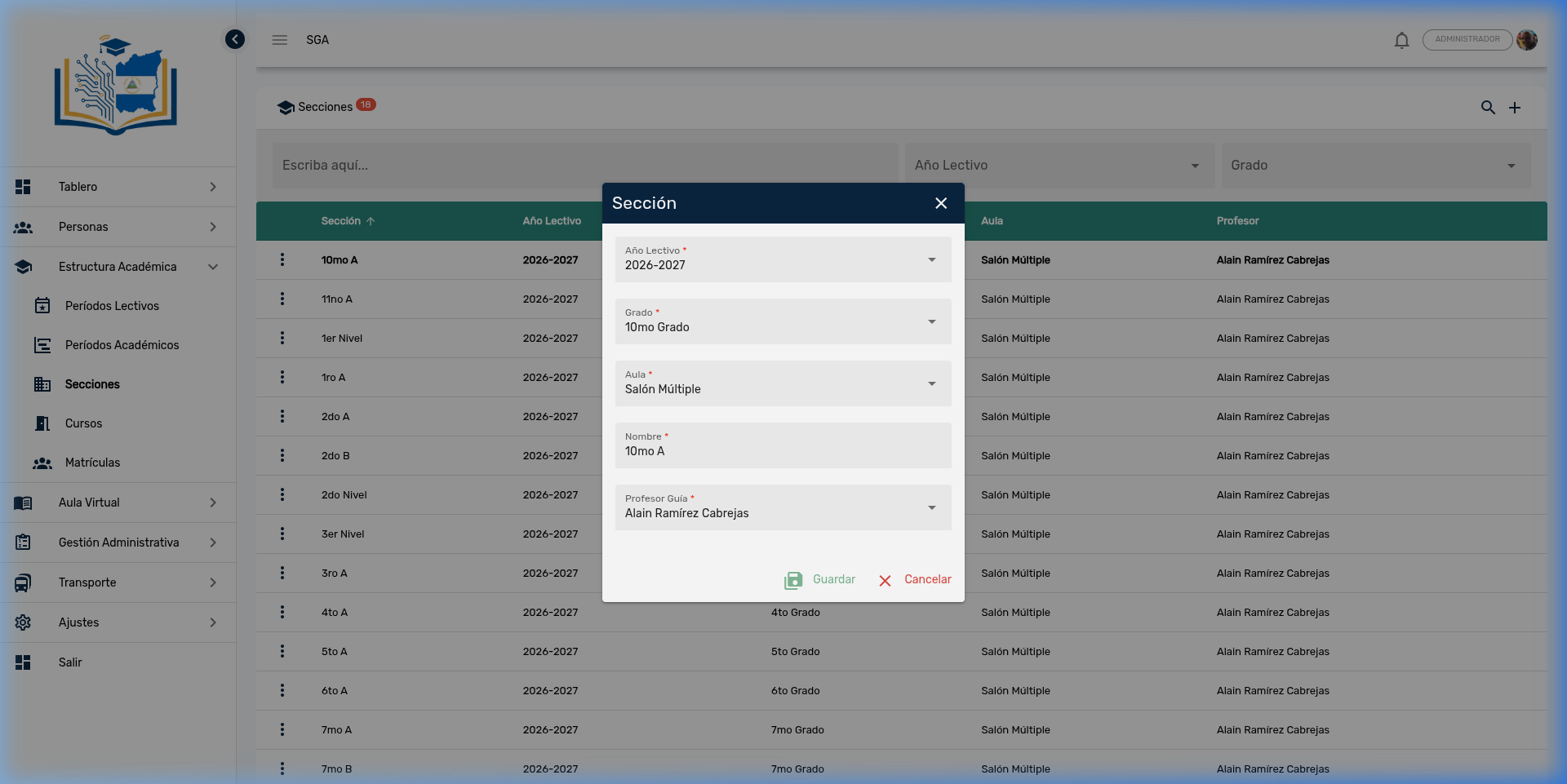
Form Fields
| Field | Type | Description | Example |
|---|---|---|---|
| School Year | Selector | School term to which it belongs | 2026-2027 |
| Grade | Selector | Educational level (school grade) | 10th Grade |
| Classroom | Selector | Assigned classroom | Multi-Purpose Hall |
| Name | Text | Section identifier | 10th A |
| Homeroom Teacher | Selector | Teacher responsible for the group | Alain Ramírez Cabrejas |
Naming convention tip
- For primary and secondary the format is: Grade + Letter (e.g., 7th A, 8th B)
- For preschool the format is: Level + identifier (e.g., 1st Level, 2nd Level)
Create a New Section
To create a new section, click the + button in the upper right corner:
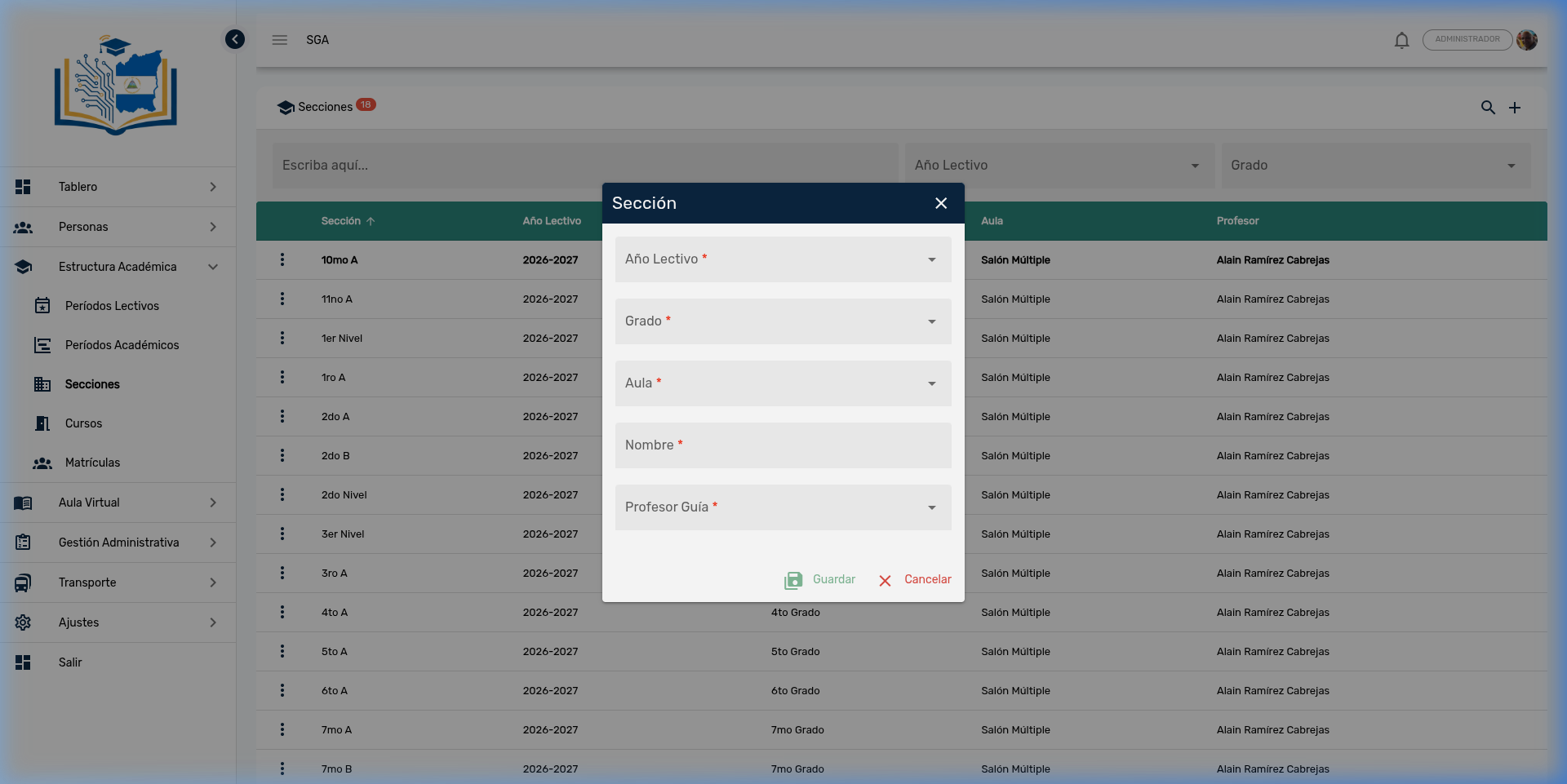
Steps to create a section:
- Click the + button
- Select the School Year to which it belongs
- Select the Grade (educational level)
- Select the assigned Classroom
- Type the Name of the section (e.g., 7th C)
- Select the responsible Homeroom Teacher
- Click Save
Note
All fields marked with a red asterisk (*) are required. The Homeroom Teacher must be previously registered in the People → Teachers module.
Example: Sections for the 2026-2027 Year
Below is an example of how sections are organized by educational level:
Preschool
| Section | Grade | Classroom | Homeroom Teacher |
|---|---|---|---|
| 1st Level | 1st Level | Multi-Purpose Hall | Alain Ramírez Cabrejas |
| 2nd Level | 2nd Level | Multi-Purpose Hall | Alain Ramírez Cabrejas |
| 3rd Level | 3rd Level | Multi-Purpose Hall | Alain Ramírez Cabrejas |
Primary
| Section | Grade | Classroom | Homeroom Teacher |
|---|---|---|---|
| 1st A | 1st Grade | Multi-Purpose Hall | Alain Ramírez Cabrejas |
| 2nd A | 2nd Grade | Multi-Purpose Hall | Alain Ramírez Cabrejas |
| 2nd B | 2nd Grade | Multi-Purpose Hall | Alain Ramírez Cabrejas |
| 3rd A | 3rd Grade | Multi-Purpose Hall | Alain Ramírez Cabrejas |
| ... | ... | ... | ... |
Secondary
| Section | Grade | Classroom | Homeroom Teacher |
|---|---|---|---|
| 7th A | 7th Grade | Multi-Purpose Hall | Alain Ramírez Cabrejas |
| 7th B | 7th Grade | Multi-Purpose Hall | Alain Ramírez Cabrejas |
| 8th A | 8th Grade | Multi-Purpose Hall | Alain Ramírez Cabrejas |
| 8th B | 8th Grade | Multi-Purpose Hall | Alain Ramírez Cabrejas |
| ... | ... | ... | ... |
| 11th A | 11th Grade | Multi-Purpose Hall | Alain Ramírez Cabrejas |
Tip
When a grade has more than one group (e.g., 7th A and 7th B), each section is registered individually with its own Homeroom Teacher. This allows greater flexibility in course and schedule assignments.
Navigation Summary — Sections
| Element | Location | Function |
|---|---|---|
| 🔍 Search | Upper right corner | Activate search bar and filters |
| ➕ Add | Upper right corner | Create new section |
| School Year | Search bar (center) | Filter by school term |
| Grade | Search bar (right) | Filter by educational level |
| ⋮ Three dots | Beginning of each row | Actions: Edit, Delete |
| 💾 Save | Inside the dialog | Confirm creation or editing |
| ✕ Cancel | Inside the dialog | Discard changes |
Module Navigation
| Path | Description |
|---|---|
| Academic Structure | Module overview |
| Periods | School terms and evaluation periods |
| Courses | Subjects, teachers, and grading types |
| Enrollments | Student enrollment |